9.5.2. hrt_model_exec Tool Introduction
9.5.2.1. Tool Introduction
hrt_model_exec is a model execution tool that can evaluate the inference performance of the model and get the model information directly on the development board.
On one hand, it allows the user to get a realistic understanding of the model’s real performance; On the other hand, it also helps the user to learn the speed limit that the model can achieve, which is useful information in application tuning.
hrt_model_exec provides three types of functions including model inference infer, model performance analysis perf and viewing model information model_info, respectively, as shown in the following table:
No. |
Subcommand |
Description |
|---|---|---|
1 |
|
Obtain model information, such as model input and output information, etc. |
2 |
|
Perform model inference and obtain model inference results. |
3 |
|
Perform model performance analysis and obtain performance analysis results. |
The tool can view the tool’s dnn prediction library version number with the -v or --version commands.
hrt_model_exec -v
hrt_model_exec --version
9.5.2.2. Description of Input Parameters
NO. |
PARAMETER |
TYPE |
DESCRIPTIONS |
|---|---|---|---|
1 |
|
string |
Model file path, multiple paths can be separated by commas. |
2 |
|
string |
Specify the name of a model in the model. |
3 |
|
int |
Specify the running core, |
4 |
|
string |
Model input information.
The input of the image type, it must have one of the following file name suffixes:
|
5 |
|
bool |
Enables resizer model inference. If the model has input from the resizer input source, it needs to be set to |
6 |
|
string |
Specify the roi region required for resizer model inference, multiple ROIs are separated by English semicolons. For example: –roi=”2,4,123,125;6,8,111,113” |
7 |
|
int |
The number of running frames of the execution model. |
8 |
|
string |
dump model each layer of input and output.
|
9 |
|
bool |
Enables dump model input and output, defaults to |
10 |
|
int |
Controls the number of decimal places of the float type data output in txt format, default is |
11 |
|
bool |
Post-process the original output and save it. It takes effect when |
12 |
|
string |
The format of the dump model input and output. |
13 |
|
int |
Control line feed rules for txt format input and output. |
14 |
|
bool |
Enables classification post-processing, defaults to |
15 |
|
int |
Execution model runtime. |
16 |
|
string |
Statistical tool log generation path, run to generate profiler.log and profiler.csv, analyze op time and scheduling time consumption.
Generally, just set |
17 |
|
int |
Number of threads (parallelism), the value can indicate how many tasks are processed in parallel at most. When testing latency, the value needs to be set to 1 to avoid resource preemption and get more accurate latency. When testing throughput, it is recommended to set >2 (number of BPU cores) to adjust the number of threads so that the BPU utilization is as high as possible, and the throughput test is more accurate. |
18 |
|
string |
Tool dump output file path, enable_dump or dump_intermediate will generate output files. After specifying the path, files will be dump to the specified path. If the path does not exist, the tool will automatically create it. |
After setting the profile_path parameter and the tool runs normally, profiler.log and profiler.csv files will be generated. The files include the following parameters:
perf_result: Record perf results.
PARAMETER
DESCRIPTIONS
FPS
Frames processed per second.
average_latency
The average time it takes to run a frame.
running_condition: Operating environment information.
PARAMETER
DESCRIPTIONS
core_id
The bpu core set by the program running.
frame_count
The total number of frames the program runs.
model_name
The name of the evaluation model.
run_time
Program running time.
thread_num
The number of threads the program runs on.
model_latency: Model node time consumption statistics
PARAMETER
DESCRIPTIONS
Preprocess
Model pre-processing takes time: DNN internal processing of input data, including padding, layout conversion, etc.
BPU_NodeName
Time-consuming information of BPU nodes. Note: NodeName is the specific node name.
CPUNodeType_NodeName
Time-consuming information of CPU nodes. Note: CPUNodeType is a specific node type, such as Dequantize, and NodeName is a specific node name.
processor_latency: Model processor time consumption statistics.
PARAMETER
DESCRIPTIONS
BPU_inference_time_cost
Inferencing BPU processor time per frame.
CPU_inference_time_cost
Inference CPU processor time per frame.
task_latency: Model task time-consuming statistics.
PARAMETER
DESCRIPTIONS
TaskPendingTime
Task queuing takes time. Note: Submitted tasks may be queued and will not run immediately.
TaskRunningTime
The actual running time of the task includes the time consumed by the DNN framework.
9.5.2.3. Usage Instructions
This tool provides three types of functions: model information acquisition, single-frame inference function, and multi-frame performance evaluation.
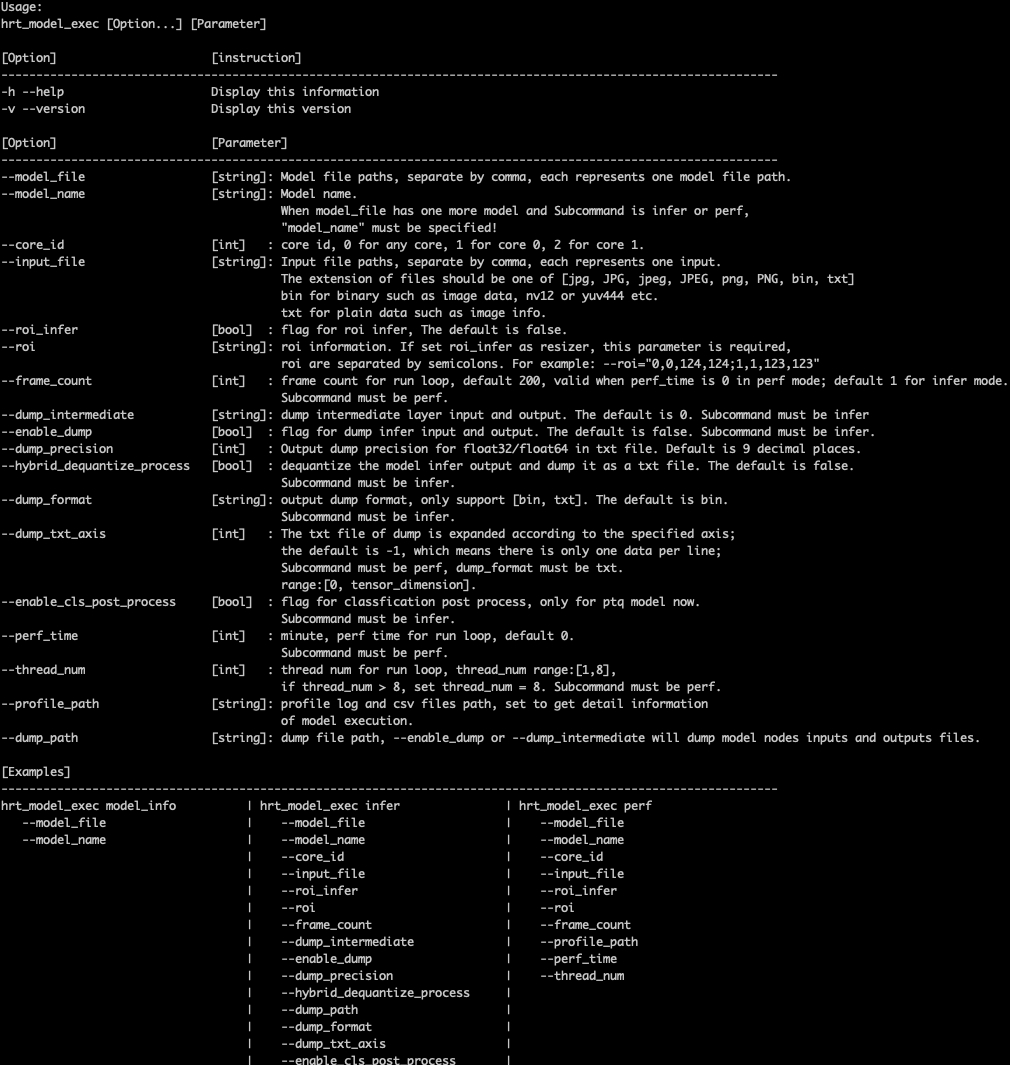
Run hrt_model_exec, hrt_model_exec -h, or hrt_model_exec --help for tool usage details, as shown in the following figure:
9.5.2.3.1. model_info
9.5.2.3.1.1. Overview
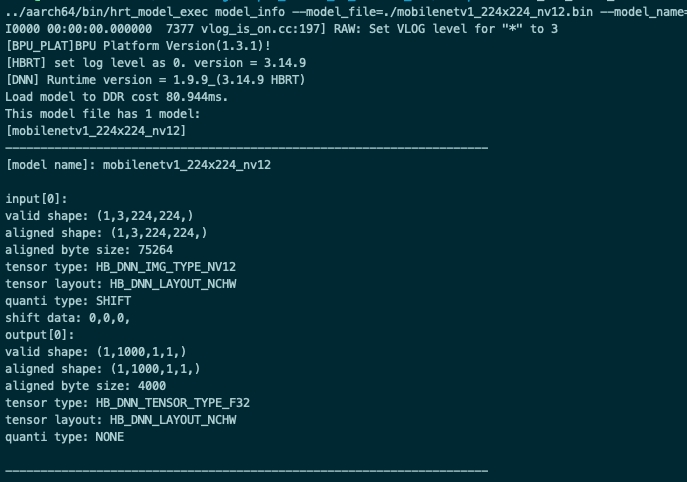
This parameter is used to get the model information, supporting both QAT and PTQ models. This parameter is used together with model_file to get detailed information about the model, including model input and output information hbDNNTensorProperties.
If model_name is not specified, all the models in the model are outputted. If model_name is specified, only the information of the corresponding model is outputted.
9.5.2.3.1.2. Example
1.Single Model
hrt_model_exec model_info --model_file=xxx.bin
2.Multi-model (output all model information)
hrt_model_exec model_info --model_file=xxx.bin,xxx.bin
3.Multi-model - pack model (output specified model information)
hrt_model_exec model_info --model_file=xxx.bin --model_name=xx
9.5.2.3.2. infer
9.5.2.3.2.1. Overview
This parameter is used for model inference, where the input images are defined by user and one frame is inferred.
This parameter should be used together with input_file to specify the input image path, and the tool resizes the image according to the model information and organizes the model input information.
The program runs a single frame of data in a single thread and outputs the time of the model execution.
9.5.2.3.2.2. Example
1.Single Model
hrt_model_exec infer --model_file=xxx.bin --input_file=xxx.jpg
2.Multi-model
hrt_model_exec infer --model_file=xxx.bin,xxx.bin --model_name=xx --input_file=xxx.jpg

3.Resizer Model
The model has three inputs, and the input source order is [ddr, resizer, resizer].
Infer data form two frames, suppose the input of the first frame is [xx0.bin, xx1.jpg, xx2.jpg], roi is [2,4,123,125;6,8,111,113], the input of the second frame is [xx3.bin, xx4.jpg, xx5.jpg], roi is [27,46,143,195;16,28,131,183], then the inference command is as follows:
hrt_model_exec infer --roi_infer=true --model_file=xxx.bin --input_file="xx0.bin,xx1.jpg,xx2.jpg,xx3.bin,xx4.jpg,xx5.jpg" --roi="2,4,123,125;6,8,111,113;27,46,143,195;16,28,131,183"
Note
Note that you should use commas to separate the multiple frame inputs, and use semicolons to separate the rois.
9.5.2.3.2.3. Optional Parameters
PARAMETER |
DESCRIPTION |
|---|---|
|
Specifies the core ID for model inference. |
|
Enables resizer model inference. |
|
Effective when |
|
Sets the number of frames to run |
|
Dumps the input+output data of each model layer, default is |
|
Dumps the input and output data of the model, defaults to |
|
Controls the number of decimal places in the txt format to output float data, default is |
|
Controls the output of float type data in txt format. Dequantizes the fixed-point output, currently only supports 4-D models. |
|
Type of dump model output file, with optional parameters |
|
Line wrapping rule for txt format output of dump model. If output dimension = n, then parameter range: [0, n], defaults to |
|
Enables classification post-processing, currently only supports PTQ classification model, defaults to |
|
Specify the dump output path, which defaults to the current path. |
9.5.2.3.3. perf
9.5.2.3.3.1. Overview
This parameter is used to test the model performance.
In this mode, the user does not need to input data, and the program automatically constructs the input tensor according to the model, and the tensor data are random numbers.
By default, the program runs 200 frames of data in a single thread. When perf_time is specified, frame_count is disabled, and the program will run for the specified period of time and then exit.
Outputs the latency and the frame rate of the model. The program prints the performance information every 200 frames: max, min, and average values of latency. If <200 frames, prints once before the programs ends.
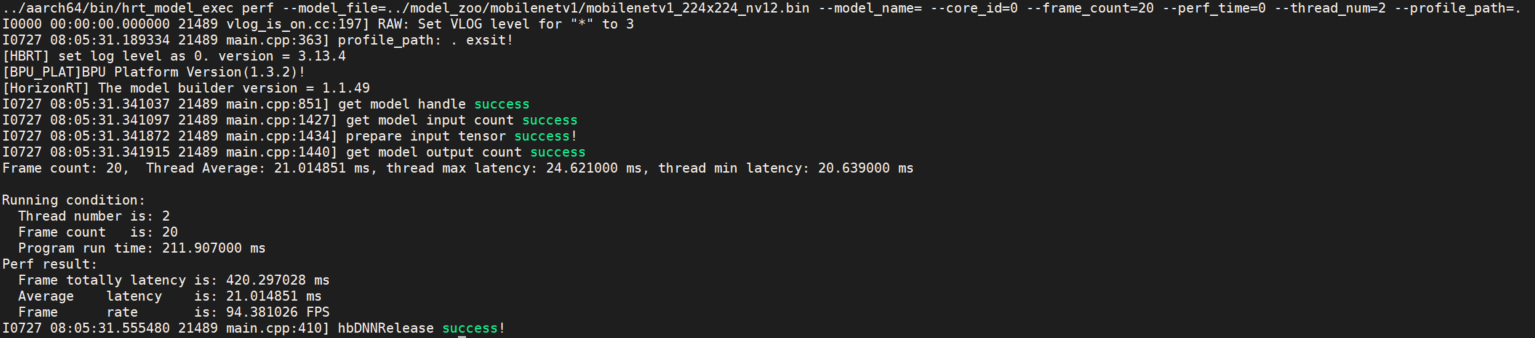
The program finally outputs the running-related data, including number of program threads, number of frames, total model inference time, average latency of model inference, and frame rate.
9.5.2.3.3.2. Example
1.Single Model
hrt_model_exec perf --model_file=xxx.bin
2.Multi-model
hrt_model_exec perf --model_file=xxx.bin,xxx.bin --model_name=xx
3.Resizer Model
The model has three inputs, and the input source order is [ddr, resizer, resizer].
Infer data from two frames at a time, suppose the input of the first frame is [xx0.bin, xx1.jpg, xx2.jpg], the roi is [2,4,123,125;6,8,111,113], and the input of the second frame is [xx3.bin, xx4.jpg ,xx5.jpg], roi is [27,46,143,195;16,28,131,183], then the perf command is as follows:
hrt_model_exec perf --roi_infer=true --model_file=xxx.bin --input_file="xx0.bin,xx1.jpg,xx2.jpg,xx3.bin,xx4.jpg,xx5.jpg" --roi="2,4,123,125;6,8,111,113;27,46,143,195;16,28,131,183"
Note
Note that you should use commas to separate the multiple frame inputs, and use semicolons to separate the rois.
9.5.2.3.3.3. Optional Parameters
PARAMETER |
DESCRIPTIONS |
|---|---|
|
Specify the core id for model inference. |
|
Model input information, multiple can be separated by commas. |
|
Enables resizer model inference, If the model contains resizer input source, set it to |
|
Effective when |
|
Set |
|
Set |
|
Set the number of threads to run, range [1, 8], default |
|
Statistical tool log generation path, run to generate profiler.log and profiler.csv, analyze op time and scheduling time consumption. |
9.5.2.3.4. Multi-threaded Latency Data Description
The purpose of multi-threading is to make full use of BPU resources, with multiple threads working together to process frame_count frame data or execute perf_time until data processing is complete/execution time is over and program ends.
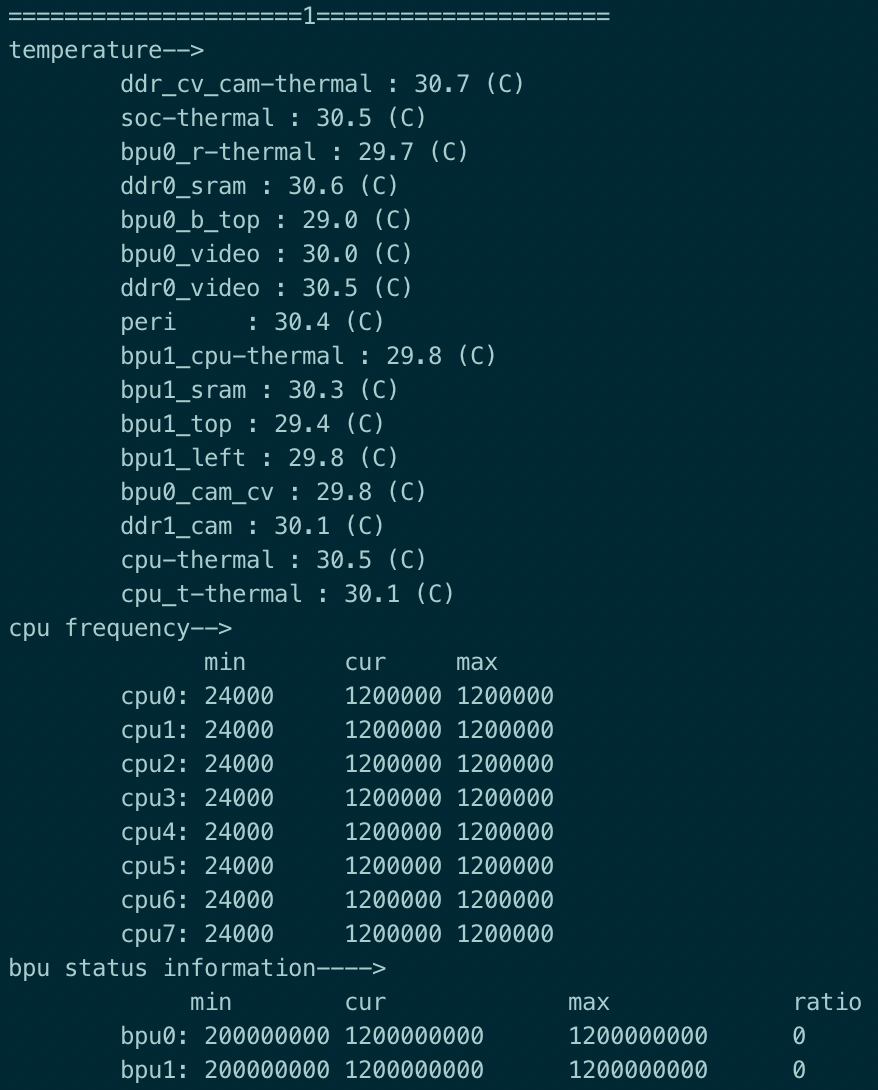
The following commands can be executed during the multithreaded perf process to get the BPU resource occupancy in real time.
hrut_somstatus -n 10000 -d 1
The output is shown in the following screenshot.
Note
In the perf mode, the latency time of a single thread indicates the measured on-board performance of the model, while the latency data for multi-threaded threads represents the model single-frame processing time for each thread, which takes longer compared to single-threaded, but the overall processing time of multi-threaded is reduced and its frame rate is improved.
9.5.2.3.5. Multi-input Model Description
The tool infer supports inference for multiple input models, supporting image input, binary file input, and text file input, with input data separated by commas.
The model input information can be viewed via model_info.
Example:
hrt_model_exec infer --model_file=xxx.bin --input_file=xxx.jpg,input.txt
9.5.2.4. FAQ
9.5.2.4.1. How are Latency and FPS data calculated?
Latency refers to the average time spent by a single-process inference model, which focuses on the average time-consuming inference on one frame when the resources are sufficient.
In on-board running situation, it is represented as the statistics of single-core and single-thread if it is running on-board.
The pseudo code of the statistical method is as follows:
// Load model and prepare input and output tensor
...

// Loop run inference and get latency
{
  int32_t const loop_num{1000};
  start = std::chrono::steady_clock::now();
  for(int32_t i = 0; i < loop_num; i++){
      hbDNNInferCtrlParam infer_ctrl_param;
      HB_DNN_INITIALIZE_INFER_CTRL_PARAM(&infer_ctrl_param);
      hbDNNInfer(&task_handle,
                &output,
                input_tensors.data(),
                dnn_handle,
                &infer_ctrl_param);
      // wait task done
      hbDNNWaitTaskDone(task_handle, 0);
      // release task handle
      hbDNNReleaseTask(task_handle);
      task_handle = nullptr;
  }
  end = std::chrono::steady_clock::now();
  latency = (end - start) / loop_num;
}

// release tensor and model
...
FPS refers to the average number of frames per second of model inference performed by multiple processes at the same time, which focuses on the throughput of the model when fully utilizing the resources.
In on-board running situation, it is represented as single-core and multi-threaded. The statistical method is to perform the model inference by initiating multiple threads at the same time and calculate the total number of frames of the inference in average 1 second.
9.5.2.4.2. Why is the FPS estimated by Latency inconsistent with the FPS measured by the tool?
Latency and FPS are different in statistical scenarios. Latency is single-process (single-core, single-thread) inference, and FPS is multi-process (single-core, multi-thread) inference,
so the calculation is different. If the number of processes (threads) is set to 1 when counting the FPS, then the FPS estimated by Latency is consistent with the measured one.
9.5.2.4.3. How to run model with custom op?
Develop custom operators by referring to the custom_identity example in basicsample. Compile the custom operators into a dynamic library and specify the path to the dynamic library before using the tool. For example, the dynamic library path is:/userdata/plugins/libplugin. so. The tool runs a model containing this custom operator, and only needs to specify the path where the dynamic library is located.
export HB_DNN_PLUGIN_PATH=/userdata/plugins/