9.5.1. hrt_bin_dump Tool Introduction
9.5.1.1. Tool Introduction
hrt_bin_dump is the layer dump tool for model, the output file of this tool is a binary file.
9.5.1.2. Description of Input Parameters
NO. |
PARAMETER |
TYPE |
MEANING |
DESCRIPTIONS |
|---|---|---|---|---|
1 |
|
string |
The model file path. |
The model file path, tool will dump all model nodes inputs and outputs |
2 |
|
string |
The input file path. |
Input file of the model, which supports all types of inputs for The IMG type file shall be a binary file (the suffix must be .bin), and the size of the binary file shall match the input information of the model. For example, the YUV444 file size is math:height * width * 3. The TENSOR type file shall be a binary file or a text file (the suffix must be .bin or .txt), and the size of the binary file shall match the input information of the model. The number of the read data in the text file must be greater than or equal to the number of the input data required by the model, and any excess data will be discarded. Each input shall be separated by a comma, for example, if the model has two inputs, then |
3 |
|
string |
The tool output path. |
The output path of the tool, which shall be a legal path. |
9.5.1.3. Instructions for Use
The tool provides dump model nodes inputs and outputs dump function, and the output file is a binary file.
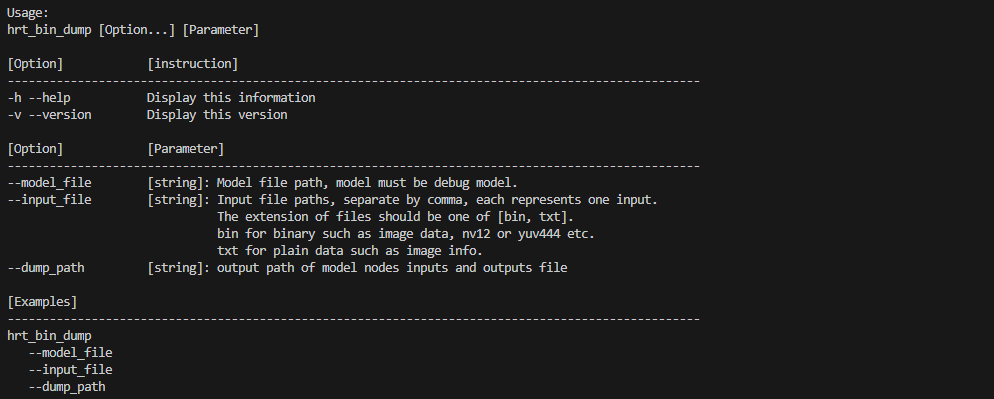
Run hrt_bin_dump directly to get tool usage details.
See the following figure.
The tool can view the tool’s dnn prediction library version number with the -v or --version commands.
hrt_bin_dump -v
hrt_bin_dump --version
9.5.1.3.1. Example
Taking the model of mobilenetv1 as an example, create the outputs folder and execute the following command.
./hrt_bin_dump --model_file=./mobilenetv1.bin --dump_path=./outputs --input_file=./input.bin
See the following screenshot for the run log.

The output can be viewed under the path outputs/ folder, see the following screenshot.
