8.1. Model Performance Optimization
Based on previous performance analysis, you may find that the performance results are less than expected. This section covers D-Robotics’s recommendations and measures to improve model performance, including:
Check Those Performance-affecting YAML Configuration Parameters;
CPU OP Processing;
High Performance Model Design Proposal;
Use D-Robotics Platform Friendly Structure & Model.
Note
Checking yaml configuration parameters and CPU OP Processing only apply to usage scenarios where the model is compiled by using hb_mapper makertbin.
Because some optimizations may influence the parameter space of the original floating-point model, in other words, it may cause model retraining. To prevent the costs of repeated adjustments and retraining brought about by model performance optimization, we suggest that you use random parameters to export models and validate performance before getting satisfactory model performance.
8.1.1. Check Those Performance-affecting YAML Configuration Parameters
Some parameters in the model conversion configuration file can affect model’s final performance, you can check if they’ve been correctly specified as you expected. The definitions and functions of all parameters please refer to the Specific Parameter Information section.
The
layer_out_dumpparameter is used to specify whether to dump the intermediate results in model conversion. Strictly speaking, this is only a debugging parameter. It will add a dequantized output node to each convolutional operator and hence significantly reduce model’s onboard performance when specified asTrue. Therefore, please remember to specify it asFalsein performance evaluation.The
compile_modeparameter is used to select whether the optimization direction is bandwidth or latency when compiling the model. If you are concerned about performance, please configure it aslatency.The
optimize_levelparameter is recommended to be specified asO3when you are going to deliver your product in order to obtain better onboard performance.The
max_time_per_fcparameter is used to control the execution time of the function-call of the compiled model data instruction, thus implementing the model priority preemption function. Setting this parameter to change the execution time of the function-call of the preempted model will affect the on-board performance of the model.
8.1.2. CPU OP Processing
If the evaluation of hrt_model_exec perf confirms that the apparent performance bottleneck is due to the current operator running on the CPU. Then in such case, we suggest that you should confirm if the OPs which currently running on the CPU can be supported by the BPU as described in the Toolchain Operator Support Constraint List section.
If the operator parameters used are outside the constraints supported by the BPU, we suggest that you adjust the corresponding computing parameters of the original floating-point model back into the restricted range. To help you quickly find out the off-limits parameter(s), we suggest that you proceed the model check procedure as described in the Check the Model section, the tool will print out the off-limits parameters at the console.
Note
Note that you’ll need to handle the effect on model performance (if any) caused by modifying the original Floating-point model parameters.
Take the input_channel or output_channel of Convolution exceeding restrictions as classic examples, by reducing number of channels to quickly enable the OP to be supported by the BPU can also affect model accuracy.
If the operator does not have BPU support, you need to optimize it according to the following conditions:
CPU operator at the middle of the model
For cases where the CPU operator is in the middle of the model, it is recommended that you try parameter adjustment, operator replacement or model modification as a priority.
CPU operator at the beginning and end of the model
For the case where the CPU operator is at the beginning and end of the model, please refer to the following example, using the quantization/anti-quantization nodes as an example.
For nodes connected to the model input and output, you can add the
remove_node_typeparameter to the yaml file model_parameters configuration group (model parameters group) and recompile the model.remove_node_type: "Quantize; Dequantize"
Or use the hb_model_modifier tool to make changes to the bin model:
hb_model_modifier x.bin -a Quantize -a Dequantize
For models like the one below that are not connected to input and output nodes, you need to use the hb_model_modifier tool to determine whether the connected nodes support deletion, and then delete them one by one in order.
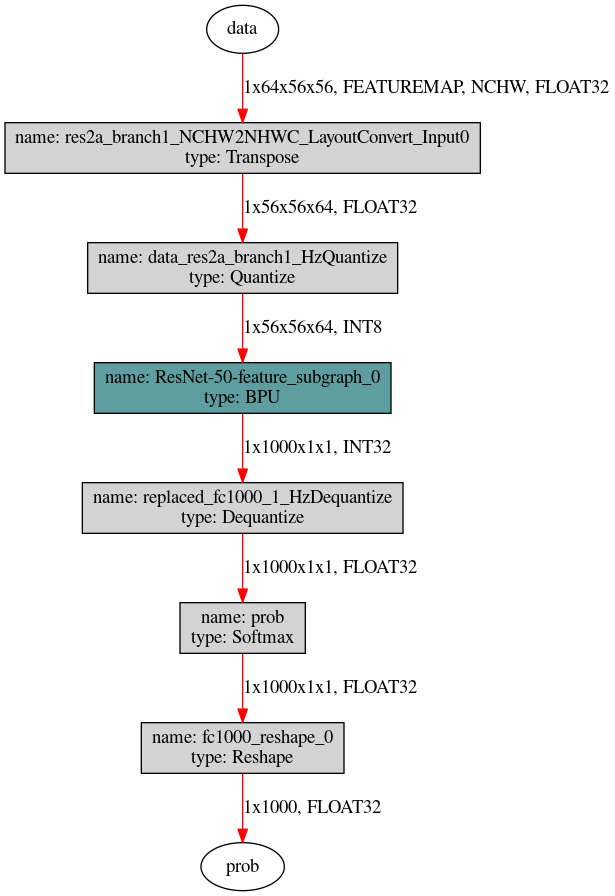
Firstly, use the hb_perf tool to get the model structure picture, and then use the following two commands to remove Quantize nodes from top to bottom. The Dequantize nodes can be deleted one by one from bottom to top, and the names of the nodes that can be deleted at each step can be viewed by
hb_model_modifier x.bin.hb_model_modifier x.bin -r res2a_branch1_NCHW2NHWC_LayoutConvert_Input0 hb_model_modifier x_modified.bin -r data_res2a_branch1_HzQuantize
8.1.3. High Performance Model Design Proposal
Based on the performance evaluation results, you can see that the CPU time consumption proportion is actually very small and that the major performance bottleneck lies in the prolonged BPU inference time consumption. In such cases, as we’ve already utilized all computing components, the remaining optimization space lies in the use ratio improvement of computing resources. Since each processor has its own hardware characteristics, whether the computing parameters of algorithm models fit hardware characteristics well can directly determine the use ratio of computing resources. The better they fit, the higher the utilization rate, and vice versa. This section elaborates the hardware characteristics of D-Robotics’s hardwares.
Firstly, D-Robotics’s computing platform are designed for CNN (Convolution Neural Network) acceleration and the major computing resources are made for processing all types of convolutions. Therefore, your models are expected to be convolution-oriented, any other types of OPs can lead to reduced computing resource utilization and the impact varies depending on different OPs.
In addition, when designing the models, the time consumption and hardware’s bandwidth pressure caused by those quantization and dequantization nodes can be relieved by reducing the input/output dimensions at the models’ BPU segments. Taking the classic segmentation models as an example, we can directly merge the Argmax operator into the model. Note that the Argmax operator can support BPU acceleration only when the following conditions are met:
By default, the axis of the Softmax layer in Caffe equals 1, however the the axis of ArgMax layer equals 0 by default, so please keep the axis value the same when replacing the operator.
The Channel of Argmax should be ≤ 64, otherwise it can only be computed on the CPU.