6.3.5. Model Inference Interface Description
The header files and library files used by the model inference API can be obtained from the package/host/host_package/x5_aarch64/dnn folder in 《Delivery Artifacts Description》.
6.3.5.1. Model Inference Library Version Information Retrieval API
hbDNNGetVersion()
【Function Prototype】
const char *hbDNNGetVersion()
【Function Description】
Retrieve version information of the DNN inference library.
【Parameters】
None
【Return Type】
Returns version information.
6.3.5.2. Model Loading/Release API
hbDNNInitializeFromFiles()
【Function Prototype】
int32_t hbDNNInitializeFromFiles(hbPackedDNNHandle_t *packedDNNHandle, const char **modelFileNames, int32_t modelFileCount)
【Function Description】
Create and initialize packedDNNHandle from files. The caller can use the returned packedDNNHandle across functions and threads.
【Parameters】
[out]
packedDNNHandleHorizon DNN handle pointing to multiple models.[in]
modelFileNamesPaths to model files.[in]
modelFileCountNumber of model files.
【Return Type】
Returns
0if the API executed successfully, otherwise execution failed.
hbDNNInitializeFromDDR()
【Function Prototype】
int32_t hbDNNInitializeFromDDR(hbPackedDNNHandle_t *packedDNNHandle, const void **modelData, int32_t *modelDataLengths, int32_t modelDataCount)
【Function Description】
Create and initialize packedDNNHandle from memory. The caller can use the returned packedDNNHandle across functions and threads.
【Parameters】
[out]
packedDNNHandleHorizon DNN handle pointing to multiple models.[in]
modelDataPointers to model data in memory.[in]
modelDataLengthsLengths of model data.[in]
modelDataCountNumber of model data entries.
【Return Type】
Returns
0if the API executed successfully, otherwise execution failed.
hbDNNRelease()
【Function Prototype】
int32_t hbDNNRelease(hbPackedDNNHandle_t packedDNNHandle)
【Function Description】
Release models pointed to by packedDNNHandle.
【Parameters】
[in]
packedDNNHandleHorizon DNN handle pointing to multiple models.
【Return Type】
Returns
0if the API executed successfully, otherwise execution failed.
6.3.5.3. Model Information Retrieval API
hbDNNGetModelNameList()
【Function Prototype】
int32_t hbDNNGetModelNameList(const char ***modelNameList, int32_t *modelNameCount, hbPackedDNNHandle_t packedDNNHandle)
【Function Description】
Retrieve the list and count of model names pointed to by packedDNNHandle.
【Parameters】
[out]
modelNameListList of model names.[out]
modelNameCountNumber of model names.[in]
packedDNNHandleHorizon DNN handle pointing to multiple models.
【Return Type】
Returns
0if the API executed successfully, otherwise execution failed.
hbDNNGetModelHandle()
【Function Prototype】
int32_t hbDNNGetModelHandle(hbDNNHandle_t *dnnHandle, hbPackedDNNHandle_t packedDNNHandle, const char *modelName)
【Function Description】
Obtain a handle to one model from the model list pointed to by packedDNNHandle. The caller can use the returned dnnHandle across functions and threads.
【Parameters】
[out]
dnnHandleDNN handle pointing to one model.[in]
packedDNNHandleDNN handle pointing to multiple models.[in]
modelNameName of the model.
【Return Type】
Returns
0if the API executed successfully, otherwise execution failed.
hbDNNGetInputCount()
【Function Prototype】
int32_t hbDNNGetInputCount(int32_t *inputCount, hbDNNHandle_t dnnHandle)
【Function Description】
Retrieve the number of input tensors for the model pointed to by dnnHandle.
【Parameters】
[out]
inputCountNumber of model input tensors.[in]
dnnHandleDNN handle pointing to one model.
【Return Type】
Returns
0if the API executed successfully, otherwise execution failed.
hbDNNGetInputName()
【Function Prototype】
int32_t hbDNNGetInputName(const char **name, hbDNNHandle_t dnnHandle, int32_t inputIndex)
【Function Description】
Retrieve the name of an input tensor for the model pointed to by dnnHandle.
【Parameters】
[out]
nameName of the model input tensor.[in]
dnnHandleDNN handle pointing to one model.[in]
inputIndexIndex of the model input tensor.
【Return Type】
Returns
0if the API executed successfully, otherwise execution failed.
hbDNNGetInputTensorProperties()
【Function Prototype】
int32_t hbDNNGetInputTensorProperties(hbDNNTensorProperties *properties, hbDNNHandle_t dnnHandle, int32_t inputIndex)
【Function Description】
Retrieve properties of a specific input tensor for the model pointed to by dnnHandle.
【Parameters】
[out]
propertiesInformation about the input tensor.[in]
dnnHandleDNN handle pointing to one model.[in]
inputIndexIndex of the model input tensor.
【Return Type】
Returns
0if the API executed successfully, otherwise execution failed.
hbDNNGetOutputCount()
【Function Prototype】
int32_t hbDNNGetOutputCount(int32_t *outputCount, hbDNNHandle_t dnnHandle)
【Function Description】
Retrieve the number of output tensors for the model pointed to by dnnHandle.
【Parameters】
[out]
outputCountNumber of model output tensors.[in]
dnnHandleDNN handle pointing to one model.
【Return Type】
Returns
0if the API executed successfully, otherwise execution failed.
hbDNNGetOutputName()
【Function Prototype】
int32_t hbDNNGetOutputName(const char **name, hbDNNHandle_t dnnHandle, int32_t outputIndex)
【Function Description】
Retrieve the name of an output tensor for the model pointed to by dnnHandle.
【Parameters】
[out]
nameName of the model output tensor.[in]
dnnHandleDNN handle pointing to one model.[in]
outputIndexIndex of the model output tensor.
【Return Type】
Returns
0if the API executed successfully, otherwise execution failed.
hbDNNGetOutputTensorProperties()
【Function Prototype】
int32_t hbDNNGetOutputTensorProperties(hbDNNTensorProperties *properties, hbDNNHandle_t dnnHandle, int32_t outputIndex)
【Function Description】
Retrieve properties of a specific output tensor for the model pointed to by dnnHandle.
【Parameters】
[out]
propertiesInformation about the output tensor.[in]
dnnHandleDNN handle pointing to one model.[in]
outputIndexIndex of the model output tensor.
【Return Type】
Returns
0if the API executed successfully, otherwise execution failed.
6.3.5.4. Model Inference API
hbDNNInfer()
【Function Prototype】
int32_t hbDNNInfer(hbDNNTaskHandle_t *taskHandle, hbDNNTensor **output, const hbDNNTensor *input, hbDNNHandle_t dnnHandle, hbDNNInferCtrlParam *inferCtrlParam)
【Function Description】
Execute inference tasks based on input parameters. The caller can use the returned taskHandle across functions and threads.
【Parameters】
[out]
taskHandlePointer to task handle.[in/out]
outputOutput of the inference task.[in]
inputInput of the inference task.[in]
dnnHandlePointer to DNN handle.[in]
inferCtrlParamParameters controlling the inference task.
【Return Type】
Returns
0if the API executed successfully, otherwise execution failed.
Note:
When submitting tasks using this interface, taskHandle should be set to nullptr in advance, unless appending tasks to a specified taskHandle (i.e., using the inferCtrlParam::more feature).
Up to 32 model tasks can exist simultaneously.
For batch models, it is allowed to set memory addresses of input tensors separately. For example: if the model’s input validShape/alignedShape is [4, 3, 224, 224], four hbDNNTensor instances can be allocated, each with validShape/alignedShape set to [1, 3, 224, 224], storing data for each batch. When the model has multiple inputs, the order of input should be input0[batch0], input0[batch1], …, inputn[batch0], inputn[batch1], ….
hbDNNRoiInfer()
【Function Prototype】
int32_t hbDNNRoiInfer(hbDNNTaskHandle_t *taskHandle, hbDNNTensor **output, const hbDNNTensor *input, hbDNNRoi *rois, int32_t roiCount, hbDNNHandle_t dnnHandle, hbDNNInferCtrlParam *inferCtrlParam)
【Function Description】
Execute ROI inference tasks based on input parameters. The caller can use the returned taskHandle across functions and threads.
【Parameters】
[out]
taskHandlePointer to task handle.[in/out]
outputOutput of the inference task.[in]
inputInput of the inference task.[in]
roisROI box information.[in]
roiCountNumber of ROI boxes.[in]
dnnHandlePointer to DNN handle.[in]
inferCtrlParamParameters controlling the inference task.
【Return Type】
Returns
0if the API executed successfully, otherwise execution failed.
Note:
If using X5, please follow the rules below:
input_count: Number of model input branchesoutput_count: Number of model output branchesresizer_count: Number of input branches with resizer as source (≤input_count). When processing a batch of data, one resizer input branch handles one ROI.roiCount: Total number of ROIs, numerically equal tobatch * resizer_countdata_batch: Number of data batches the model needs to infer, numerically equal toroiCount / resizer_countmodel_batch: Internal batch size of the model, i.e., the batch_size actually fed into the model during inference. The X5 algorithm toolchain supports compiling models as batch models.
Input/Output Example Explanation:
Taking a complex multi-input model as an example, assume the model has 3 input branches (2 resizer sources, 1 DDR source) and 1 output branch, compiled with batch=2. The model needs to process 3 batches of data, totaling 6 ROIs (i.e., 2 ROIs per batch), then we have the following information:
input_count= 3output_count= 1resizer_count= 2roiCount= 6data_batch= 3model_batch= 2
Therefore, the number of input_tensors with independent addresses required for the model to infer these 3 batches of data is input_count * data_batch = 9.
Suppose the static input/output information of the model is as follows:
Model input (model_info):
tensor_0_resizer: [2, 3, 128, 128]
tensor_1_resizer: [2, 3, 256, 256]
tensor_2_ddr: [2, 80, 1, 100]
Model output (model_info):
tensor_out: [2, 100, 1, 56]
Then the dynamic information during model inference would be:
Model input (input_tensors):
[1x3x128x128, 1x3x256x256, 1x80x1x100, 1x3x128x128, 1x3x256x256, 1x80x1x100, 1x3x128x128, 1x3x256x256, 1x80x1x100]
Model output (output_tensors):
[4x100x1x56]
Among them, since model_batch = 2, the underlying BPU can process 2 batches of data in a single execution; and because data_batch = 3, the formula for calculating the highest dimension of output_tensor is ceil[(data_batch) / model_batch] * model_batch, which must be an integer multiple of model_batch, as required by BPU hardware instructions. Missing inputs will be automatically ignored in computation.
Interface Limitations:
Regarding
batchsize limit: the range should be [1, 255].When submitting tasks via this interface,
taskHandleshould be set tonullptrin advance, unless appending tasks to a specifiedtaskHandle(i.e., usinginferCtrlParam::morefeature).roisize requirements: :math:2 <= width <= 4096, :math:2 <= height <= 4096.Original image size requirements: :math:
1 <= W <= 4096, :math:16 <= stride <= 131072, wherestridemust be a multiple of 16.Output size requirements: :math:
2 <= Wout, :math:2 <= Hout.ROI scaling factor limit: :math:
0 <= step <= 262143, step calculation formula: :math:step = ((src\_len - 1)*65536 + (dst\_len - 1)/2)/(dst\_len - 1), where src_len is the W or H of the ROI, and dst_len is the required W or H of the model.Up to 32 model tasks can exist simultaneously.
hbDNNWaitTaskDone()
【Function Prototype】
int32_t hbDNNWaitTaskDone(hbDNNTaskHandle_t taskHandle, int32_t timeout)
【Function Description】
Wait for task completion or timeout.
【Parameters】
[in]
taskHandlePointer to task handle.[in]
timeoutTimeout setting (unit: milliseconds).
【Return Type】
Returns
0if the API executed successfully, otherwise execution failed.
Note:
timeout > 0means the waiting duration;timeout <= 0means wait indefinitely until the task completes.
hbDNNReleaseTask()
【Function Prototype】
int32_t hbDNNReleaseTask(hbDNNTaskHandle_t taskHandle)
【Function Description】
Release the task. If the task has not started execution, it will be canceled and released immediately. If already executing, it will be canceled and released after reaching certain nodes.
【Parameters】
[in]
taskHandlePointer to task handle.
【Return Type】
Returns
0if the API executed successfully, otherwise execution failed.
6.3.5.5. Model Memory Operation API
hbSysAllocMem()
【Function Prototype】
int32_t hbSysAllocMem(hbSysMem *mem, uint32_t size)
【Function Description】
Allocate BPU memory.
【Parameters】
[in]
sizeSize of memory to allocate.[out]
memMemory pointer.
【Return Type】
Returns
0if the API executed successfully, otherwise execution failed.
hbSysAllocCachedMem()
【Function Prototype】
int32_t hbSysAllocCachedMem(hbSysMem *mem, uint32_t size)
【Function Description】
Allocate cached BPU memory.
【Parameters】
[in]
sizeSize of memory to allocate.[out]
memMemory pointer.
【Return Type】
Returns
0if the API executed successfully, otherwise execution failed.
hbSysFlushMem()
【Function Prototype】
int32_t hbSysFlushMem(hbSysMem *mem, int32_t flag)
【Function Description】
Flush cached BPU memory.
【Parameters】
[in]
memMemory pointer.[in]
flagFlush flag.
【Return Type】
Returns
0if the API executed successfully, otherwise execution failed.
hbSysFreeMem()
【Function Prototype】
int32_t hbSysFreeMem(hbSysMem *mem)
【Function Description】
Free BPU memory.
【Parameters】
[in]
memMemory pointer.
【Return Type】
Returns
0indicates the API executed successfully; otherwise, the execution failed.
hbSysWriteMem()
【Function Prototype】
int32_t hbSysWriteMem(hbSysMem *dest, char *src, uint32_t size)
【Function Description】
Write to BPU memory.
【Parameters】
[out]
destMemory pointer.[in]
srcData pointer.[in]
sizeData size.
【Return Type】
Returns
0indicates the API executed successfully; otherwise, the execution failed.
hbSysReadMem()
【Function Prototype】
int32_t hbSysReadMem(char *dest, hbSysMem *src, uint32_t size)
【Function Description】
Read from BPU memory.
【Parameters】
[out]
destData pointer.[in]
srcMemory pointer.[in]
sizeData size.
【Return Type】
Returns
0indicates the API executed successfully; otherwise, the execution failed.
hbSysRegisterMem()
【Function Prototype】
int32_t hbSysRegisterMem(hbSysMem *mem)
【Function Description】
Register a memory region with known physical address as a memory identifier usable by the BPU. The resulting memory is cacheable.
【Parameters】
[in/out]
memMemory pointer.
【Return Type】
Returns
0indicates the API executed successfully; otherwise, the execution failed.
hbSysUnregisterMem()
【Function Prototype】
int32_t hbSysUnregisterMem(hbSysMem *mem)
【Function Description】
Unregister a memory identifier previously registered by hbSysRegisterMem.
【Parameters】
[in]
memMemory pointer.
【Return Type】
Returns
0indicates the API executed successfully; otherwise, the execution failed.
6.3.5.6. Data Types and Data Structures
Version Information
HB_DNN_VERSION_MAJOR
##define HB_DNN_VERSION_MAJOR 1U
Major version number of DNN.
HB_DNN_VERSION_MINOR
##define HB_DNN_VERSION_MINOR 1U
Minor version number of DNN.
HB_DNN_VERSION_PATCH
##define HB_DNN_VERSION_PATCH 0U
Patch version number of DNN.
Note:
Note that the version numbers in this section may vary with versions. The version numbers shown here are for reference only. Please refer to the actual release you obtained for the correct version.
System-related Types
hbBPUCore
typedef enum {
  HB_BPU_CORE_ANY = 0,
  HB_BPU_CORE_0 = (1 << 0),
  HB_BPU_CORE_1 = (1 << 1)
} hbBPUCore;
BPU core enumeration. The X5 system has only one BPU core and only supports specifying HB_BPU_CORE_ANY or HB_BPU_CORE_0.
Members
| Member Name | Description |
|---|---|
HB_BPU_CORE_ANY |
Any BPU core. |
HB_BPU_CORE_0 |
BPU core 0. |
HB_BPU_CORE_1 |
BPU core 1. |
hbDSPCore
typedef enum {
  HB_DSP_CORE_ANY = 0,
  HB_DSP_CORE_0 = (1 << 0),
  HB_DSP_CORE_1 = (1 << 1)
} hbDSPCore;
DSP core enumeration.
| Member Name | Description |
|---|---|
HB_DSP_CORE_ANY |
Any DSP core. |
HB_DSP_CORE_0 |
DSP core 0. |
HB_DSP_CORE_1 |
DSP core 1. |
hbSysMem
typedef struct {
  uint64_t phyAddr;
  void *virAddr;
  uint32_t memSize;
} hbSysMem;
System memory structure, used for allocating system memory.
Members
| Member Name | Description |
|---|---|
phyAddr |
Physical address. |
virAddr |
Virtual address. |
memSize |
Memory size. |
hbSysMemFlushFlag
typedef enum {
  HB_SYS_MEM_CACHE_INVALIDATE = 1,
  HB_SYS_MEM_CACHE_CLEAN = 2
} hbSysMemFlushFlag;
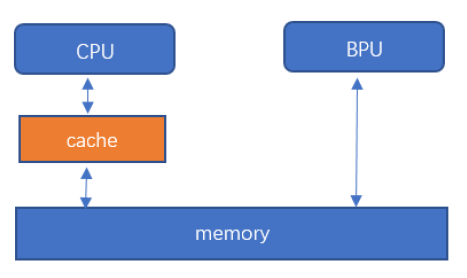
Parameters for synchronizing system memory with cache. There is a cache layer between CPU and memory, which may cause inconsistency between cache and memory data. To ensure the latest data is always available, data must be updated before CPU reads and after CPU writes. Before CPU reads, data from memory should be loaded into cache. After CPU writes, data from cache should be flushed back to memory.
Members
| Member Name | Description |
|---|---|
HB_SYS_MEM_CACHE_INVALIDATE |
Synchronize memory to cache, used before CPU read. |
HB_SYS_MEM_CACHE_CLEAN |
Synchronize cache to memory, used after CPU write. |
Preprocessing Classes
HB_DNN_INITIALIZE_RESIZE_CTRL_PARAM
#define HB_DNN_INITIALIZE_RESIZE_CTRL_PARAM(param)     \
  {                                                     \
    (param)->bpuCoreId = HB_BPU_CORE_ANY;              \
    (param)->resizeType = HB_DNN_RESIZE_TYPE_BILINEAR; \
    (param)->priority = HB_DNN_PRIORITY_LOWEST;        \
    (param)->reserved1 = 0;                             \
    (param)->reserved2 = 0;                             \
    (param)->reserved3 = 0;                             \
    (param)->reserved4 = 0;                             \
  }
Initializes control parameters.
hbDNNResizeType
typedef enum {
  HB_DNN_RESIZE_TYPE_BILINEAR = 0,
} hbDNNResizeType;
Resize type.
Members
| Member Name | Description |
|---|---|
HB_DNN_RESIZE_TYPE_BILINEAR |
Resize type is bilinear interpolation. |
hbDNNResizeCtrlParam
typedef struct {
  int32_t bpuCoreId;
  int32_t priority;
  hbDNNResizeType resizeType;
  int32_t reserved1;
  int32_t reserved2;
  int32_t reserved3;
  int32_t reserved4;
} hbDNNResizeCtrlParam;
Control parameters for Resize.
Members
| Member Name | Description |
|---|---|
bpuCoreId |
BPU core ID. |
priority |
Task priority. |
resizeType |
Resize type. |
reserved1 |
Reserved field 1. |
reserved2 |
Reserved field 2. |
reserved3 |
Reserved field 3. |
reserved4 |
Reserved field 4. |
6.3.5.7. Data Layout and Alignment Rules
Data Layout
Internally, hardware uses a special data layout to improve computational efficiency, arranging feature maps and kernels used in the same batch of convolution operations adjacently in memory. The following briefly introduces the concept of data layout in the X5 processor.
Variables in neural network models can be represented as a 4-dimensional tensor, with each number being an element of the tensor—this is referred to as natural layout. Elements from different dimensions are tightly packed together according to certain rules into small independent blocks. These blocks are then treated as new elements to form a new 4-dimensional tensor, which is called a tensor with data layout.
Input and output data use different layout formats. Users can obtain layout description information via APIs, and data with different layouts cannot be directly compared.
Note:
When performing data layout transformation, if padding is required, it is recommended to set the padding value to zero.
Two data layouts are introduced here: NHWC_NATIVE and NCHW_NATIVE. Taking NHWC_NATIVE as an example, its data layout is as follows:
| N0H0W0C0 | N0H0W0C1 | …… |
| N0H0W1C0 | N0H0W1C1 | …… |
| …… | …… | …… |
| N0H1W0C0 | N0H1W0C1 | …… |
| …… | …… | …… |
| N1H0W0C0 | N1H0W0C1 | …… |
| …… | …… | …… |
A tensor of size N×H×W×C can be expressed using the following 4-level loop:
for (int32_t n = 0; n < N; n++) {
    for (int32_t h = 0; h < H; h++) {
        for (int32_t w = 0; w < W; w++) {
            for (int32_t c = 0; c < C; c++) {
                int32_t native_offset = n*H*W*C + h*W*C + w*C + c;
            }
        }
    }
}
The only difference between NCHW_NATIVE and NHWC_NATIVE is the loop order, so it is not listed separately.
caution In the following text, “native” specifically refers to this layout.
BPU Alignment Restrictions
This section describes alignment restrictions when using the BPU.
Model Input Requirements
The BPU does not restrict model input size or parity. Inputs like YOLO’s 416×416 are supported, as well as SqueezeNet’s 227×227. NV12 input is special—it requires both height (H) and width (W) to be even numbers, to meet the requirement that UV is half the size of Y.
Alignment and Valid Data
The BPU has alignment restrictions on data. Alignment requirements and actual data layout are represented by validShape, alignedShape, and stride in hbDNNTensorProperties.
validShapeis the actual valid shape;alignedShapeis the shape satisfying alignment requirements. Due to hardware characteristics,alignedShapeis always represented as a 4-dimensional shape;strideindicates the stride of each dimension invalidShape. For models with NV12 input,strideis always 0 because such models only require W to be 16-byte aligned.
Currently, 4D model tensors can obtain correct data layout via validShape and alignedShape. For tensors in X5 models with more than 4 dimensions, correct layout can be obtained using validShape and stride.
Introduction to NV12
YUV Format
YUV format is primarily used to optimize the transmission of color video signals. YUV consists of three components: Y represents luminance (i.e., grayscale), while U and V represent chrominance, describing color and saturation, and are used to specify pixel colors.
NV12 Layout
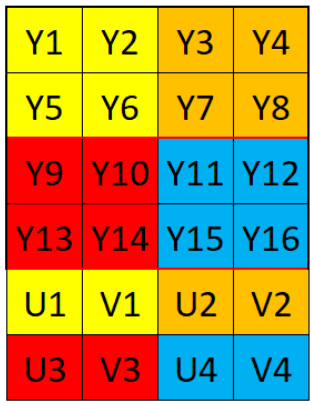
NV12 image format belongs to the YUV420SP format in the YUV color space. Every four Y components share one set of U and V components. Y components are stored sequentially, while U and V are interleaved.
The layout is as follows:
6.3.5.8. Model Inference DEBUG Methods
Error Codes
HB_DNN_SUCCESS = 0                              // Operation succeeded
HB_DNN_INVALID_ARGUMENT = -6000001              // Invalid argument
HB_DNN_INVALID_MODEL = -6000002                 // Invalid model
HB_DNN_MODEL_NUMBER_EXCEED_LIMIT = -6000003     // Number of models exceeds limit
HB_DNN_INVALID_PACKED_DNN_HANDLE = -6000004     // Invalid packed handle
HB_DNN_INVALID_DNN_HANDLE = -6000005            // Invalid handle
HB_DNN_CAN_NOT_OPEN_FILE = -6000006             // File does not exist
HB_DNN_OUT_OF_MEMORY = -6000007                 // Insufficient memory
HB_DNN_TIMEOUT = -6000008                       // Timeout
HB_DNN_TASK_NUM_EXCEED_LIMIT = -6000009         // Number of tasks exceeds limit
HB_DNN_TASK_BATCH_SIZE_EXCEED_LIMIT = -6000010  // Batch size exceeds limit
HB_DNN_INVALID_TASK_HANDLE = -6000011           // Invalid task handle
HB_DNN_RUN_TASK_FAILED = -6000012               // Task execution failed
HB_DNN_MODEL_IS_RUNNING = -6000013              // Task is running
HB_DNN_INCOMPATIBLE_MODEL = -6000014            // Incompatible model
HB_DNN_API_USE_ERROR = -6000015                 // API usage error
HB_DNN_MULTI_PROGRESS_USE_ERROR = -6000016      // Multi-process usage error

HB_SYS_SUCCESS = 0                              // Operation succeeded
HB_SYS_INVALID_ARGUMENT = -6000129              // Invalid argument
HB_SYS_OUT_OF_MEMORY = -6000130                 // Insufficient memory
HB_SYS_REGISTER_MEM_FAILED = -6000131           // Failed to register memory
Configuration Information
Log levels. Logs in
dnnare mainly divided into 4 levels:HB_DNN_LOG_NONE = 0: No log output;HB_DNN_LOG_WARNING = 3: Used to output warning messages in code;HB_DNN_LOG_ERROR = 4: Used to output error messages in code;HB_DNN_LOG_FATAL = 5: Used to output fatal errors that cause program termination.
Log level setting rules:
A log will be printed if its level is greater than or equal to the set level; otherwise, it will be suppressed. The lower the set log level (except level 0, which disables all logs), the more messages will be printed.
For example: Setting log level to 3 (i.e.,WARNING) means logs of levels 3, 4, and 5 will be printed.
The default log level in the inference library isHB_DNN_LOG_WARNING, so the following log levels will be printed:WARNING,ERROR,FATAL.How to set log level:
Use the environment variableHB_DNN_LOG_LEVELto set the log level.
Example:export HB_DNN_LOG_LEVEL=3will output logs atWARNINGlevel and above.Common Environment Variables
 HB_DNN_LOG_LEVEL                // Set log level.
 HB_DNN_PLUGIN_PATH              // Custom directory for CPU operator dynamic libraries.
 HB_DNN_PROFILER_LOG_PATH        // Path to dump profiling information on model execution stages.
 HB_DNN_SIM_PLATFORM             // x86 simulator platform setting; can be set to BERNOULLI, BERNOULLI2, BAYES, BAYESE.
 HB_DNN_SIM_BPU_MEM_SIZE         // Set BPU memory size for x86 simulator, in MB.
Notes on Using Simulator on Development Machine
When using the simulator on a development machine, the target processor architecture can be specified by setting the environment variable
HB_DNN_SIM_PLATFORM. For example:export HB_DNN_SIM_PLATFORM=BAYESEmeans simulating thex5platform;
If the
HB_DNN_SIM_PLATFORMenvironment variable is not set, the simulator platform will be determined by the architecture of the first loaded model. For example, if the first loaded model is ofBAYESEarchitecture, the platform will be set tox5by default.Before performing
resizeoperations in the development machine simulator, the platform must be specified using theHB_DNN_SIM_PLATFORMenvironment variable.