4.1.2.8. The hb_model_modifier Tool
The hb_model_modifier tool is used to delete Transpose, Quantize, Cast, and Reshape nodes on the input side and Transpose, Dequantize, DequantizeFilter, Cast, Reshape, and Softmax nodes on the output side of the specified runtime model.
Information of the deleted nodes will be saved in the BIN models and can be viewed by using the hb_model_info tool.
Note
This tool can only delete nodes which are immediately adjacent to the model input or output. If the node to be deleted is followed by another node, then the deletion operation cannot be performed.
The node names of the model need cannot include special symbols such as “;” and “,”, otherwise it may cause problems when using the tool.
This tool cannot process packed models. If you do so, it will print:
ERROR pack model is not supported.The nodes to be deleted will be deleted sequentially and the model structure will be updated dynamically. It will also determine the location of the node, whether it is at the input side or the output side of the model before being deleted, so the node deletion order matters.
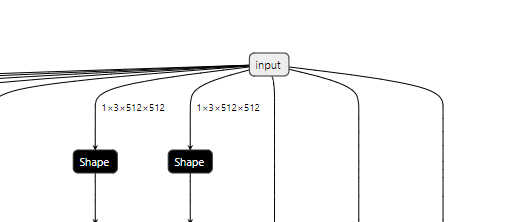
Since the deletion of a specific node affects the input of the model, the tool is only applicable to the case where there is only one pathway after the input of the model, but not to the case where there are multiple nodes correspond to the same input, as shown in the figure below:
4.1.2.8.1. How to Use
View the nodes that can be deleted:
hb_model_modifier model.bin
Delete a single specified node (node1 for example):
hb_model_modifier model.bin -r node1
Delete multiple specified nodes (node1, node2, node3 for example):
hb_model_modifier model.bin -r node1 -r node2 -r node3
Delete a node of a certain type (Dequantize for example):
hb_model_modifier model.bin --all Dequantize
Delete multiple types of nodes (Reshape, Cast, Dequantize for example):
hb_model_modifier model.bin -a Reshape -a Cast -a Dequantize
Combination use:
hb_model_modifier model.bin -a Reshape -a Cast -a Dequantize -r node1 -r node2 -r node3
4.1.2.8.2. Parameters
- Parameters:
- model_file
Specifies the file name of runtime model.
- -r
Specifies the name of the to-be-deleted node. To delete multiple nodes, you need to specify the name for multiple times.
- -o
Specifies the output name of the modified model (effective when
-rexists).- -a, --all
Specifies the node type to delete all corresponding types with one click. To delete multiple types of nodes, you need to specify the type for multiple times.
4.1.2.8.3. Output Contents
If no parameters are specified after the command, the tool will print all the nodes that can be deleted (i.e., all Transpose, Quantize, Dequantize, DequantizeFilter, Cast, Reshape, and Softmax nodes located at both input and output positions of the model).
The Quantize node is used to quantize the input data of the model from the float type to int8 type, which uses the following formula:
qx = clamp(round(x / scale) + zero_point, -128, 127)
round(x)rounds the floating point number.clamp(x)clamps the data to an integer value between -128 and 127.scaleis the quantized scale factor.zero_pointis the asymmetric quantization zero-point offset value. When in symmetric quantization,zero_point = 0.
The C++ reference implementation is as follows:
static inline float32_t _round(float32_t const input) {
  std::fesetround(FE_TONEAREST);
  float32_t const result{std::nearbyintf(input)};
  return result;
}
static inline int8_t int_quantize(float32_t value, float32_t const scale) {
  value = _round(value / scale);
  value = std::min(std::max(value, -128.0f), 127.0f);
  return static_cast<int8_t>(value);
}
The Dequantize node is used to dequantize output data of the model from the int8 or int32 type back to float or double type with the following formula:
deqx = (x - zero_point) * scale
The C++ reference implementation is as follows.
static_cast<float>(value) * scale
Note
The tool currently supports the deletion of the following nodes:
Quantize, Transpose, Cast, and Reshape nodes at the input position.
Dequantize, DequantizeFilter, Transpose, Cast, Reshape, and Softmax nodes at the output position.
Messages printed by the tool are as follows:
hb_model_modifier resnet50_64x56x56_featuremap.bin
2022-04-21 18:22:30,207 INFO Nodes that can be deleted: ['data_res2a_branch1_HzQuantize_TransposeInput0', 'fc1000_reshape_0']
When the -r option is specified, the tool will print model node type and node information saved in the BIN file and notify users of the deletion, as follows:
hb_model_modifier resnet50_64x56x56_featuremap.bin -r data_res2a_branch1_HzQuantize_TransposeInput0
Node 'data_res2a_branch1_HzQuantize_TransposeInput0' found, its OP type is 'Transpose'
Node 'data_res2a_branch1_HzQuantize_TransposeInput0' is removed
modified model saved as resnet50_64x56x56_featuremap_modified.bin
Users can view the information using the hb_model_info tool.
Names of the deleted nodes will be printed at the end of the output information. Meanwhile, a deleted-nodes_info.txt will be generated, which records the original information of those deleted nodes in lines (only the Quantize, Dequantize, DequantizeFilter and Transpose nodes will be recorded here).
The steps to print the names of the deleted nodes are as follows:
hb_model_info resnet50_64x56x56_featuremap_modified.bin
Start hb_model_info....
hb_model_info version 1.7.0
********* resnet50_64x56x56_featuremap info *********
...
--------- deleted nodes -------------------
deleted nodes: data_res2a_branch1_HzQuantize_TransposeInput0