Vision-Language-Action Model (VLA)
VLA (Vision-Language-Action Model) is an end-to-end model that combines visual understanding, language interaction, and robot control. It generates robot actions directly from visual input and language instructions, and is widely used in embodied intelligence and robot manipulation. Representative work includes Google's RT-2 and Physical Intelligence's Pi0.
| Hardware Requirements | Algorithm | Performance Benchmark |
|---|---|---|
| RDK S600 | Pi0 | all (ms): 98 pre-process (ms): 1.5 vision (ms): 18.5 language (ms): 39 action (ms): 38.5 post-process (ms): 0.05 memory (GB): 4.4 |
-
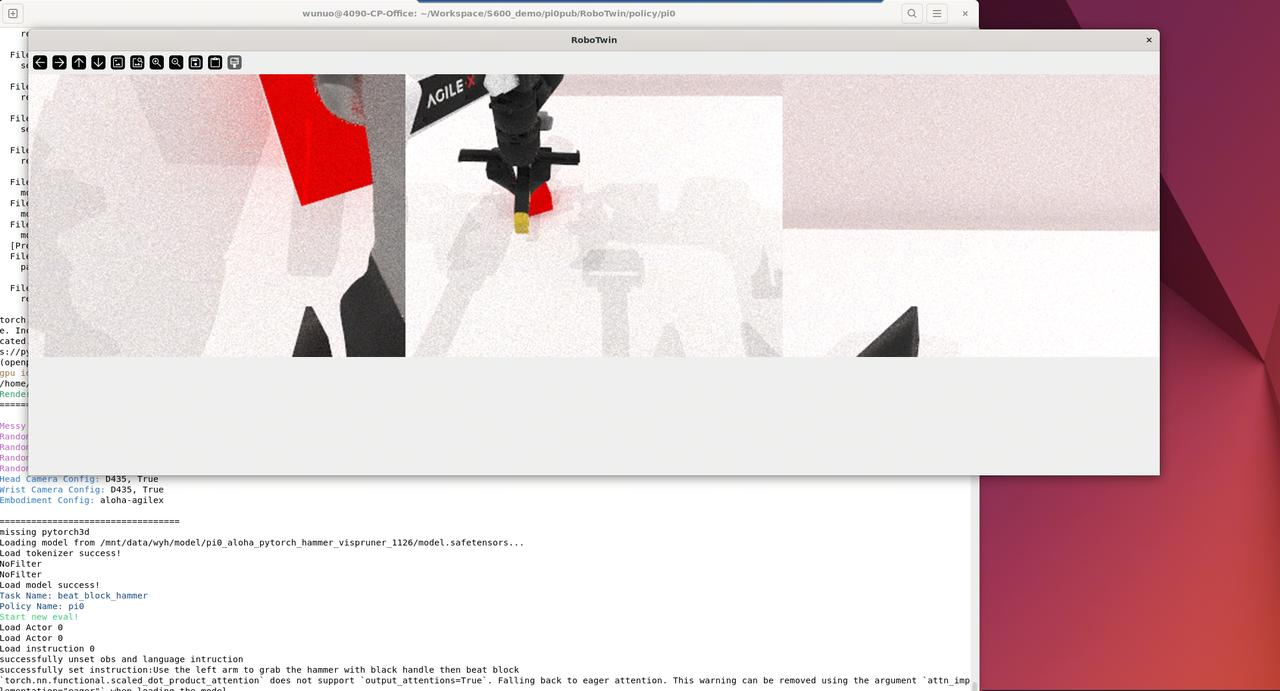
Deploy the RoboTwin simulation environment on PC to obtain model inputs, execute model outputs, and observe Pi0 inference results.
-
Deploy the Pi0 model on S600 for on-device inference and latency statistics.
-
For custom-trained Pi0 models or real-robot co-deployment, see More Resources.
This workflow requires a PC-side simulation environment. The interaction flow is as follows:
         【 S600 】                                 【 PC 】
    +-------------------+                    +-------------------+
    |  OELLM Deployment |                    | x86 Sim Deployment|
    +---------+---------+                    +---------+---------+
              |                                        |
              v                                        v
    +---------+---------+                    +---------+---------+
    |    Run Model      |                    |    Run Simulation |
    +---------+---------+                    +---------+---------+
              |                                        |
              v                                        v
    +---------+---------+                    +---------+---------+
    |   Waiting State   |<------------------+    Send State      |
    +---------+---------+                    +---------+---------+
              |                                        ^
              v                                        |
    +---------+---------+                    +---------+---------+
    |  Model Inference  |                    |  Simulation Step  |
    +---------+---------+                    +-----------+-------+
              |                                        ^
              v                                        |
    +---------+---------+                    +---------+---------+
    |   Send Actions    +------------------->|   Receive Actions |
    +-------------------+                    +-------------------+
PC Simulation Deployment
Environment Setup
Please ensure that Conda is installed in the PC environment and that Conda is functioning properly. For Conda installation, please refer to Conda Installation.
# Clone repository
git clone https://github.com/D-Robotics/RoboTwin.git
cd RoboTwin/
git checkout pi0pub

# Prepare virtual environment
# Under RoboTwin/
conda create -n RoboTwin python=3.10 -y
conda activate RoboTwin
pip install uv
# Under RoboTwin/policy/pi0/
cd policy/pi0
GIT_LFS_SKIP_SMUDGE=1 uv sync
cp -r ./src/openpi/models_pytorch/transformers_replace/* .venv/lib/python3.11/site-packages/transformers/

# Install curobo
# Under RoboTwin/policy/pi0/
conda deactivate
source .venv/bin/activate
# At this point, you should be in the (openpi) environment
cd ../../envs
git clone https://github.com/NVlabs/curobo.git
cd curobo
export CUROBO_DISABLE_CUDA_EXT=0
pip install -e . --no-build-isolation # Takes a long time

# Download assets
# Enter Robotwin/assets/
# At ~2 MB/s download speed, this step takes 2+ hours
bash download.sh
- curobo installation failure
Try export CUROBO_DISABLE_CUDA_EXT=1 then run pip install -e . --no-build-isolation # Takes a long time
- High CUDA version incompatibility
If you use CUDA 13.0 or above, update PyTorch after uv sync. In the openpi virtual environment, run pip install --pre torch torchvision --index-url https://download.pytorch.org/whl/nightly/cu130
Configuration
Edit RoboTwin/task_config/config.yaml as shown below:
# Testing
sample: 0              # Sample index
rnd: false             # Enable random sampling; false uses the sample index as-is
restore: false         # Enable resume from checkpoint

# Deployment
stage: 3               # Test stage: OBS=0, SKIP, ACTION, FULL
use_cpp: true          # On-device inference only; no inference on sim side (optional when stage is FULL)
torch_model: "policy/pi0/torch_model/pi0_aloha_pytorch_hammer_vispruner_1126"
                       # PyTorch model path
port: 8888             # Port for socket connections

# Filtering
filter:  0             # Filter type: 0 disabled; 1 Butterworth; 2 FIR; 3 ZeroPhase
cutoff: 3              # Cutoff frequency
fs: 50                 # Sampling frequency
channels: 14           # Filter dimensions

# Inference
chunk: 50              # chunk_size per round (max=50)
visp: true             # Use vispruner token compression
do_preproc: false      # Send preprocessed OBS
do_postproc: false     # Apply post-processing to received actions
debug: false

# Display
use_video: true         # Save simulation video
spcam: false            # Use custom camera; adjust resolution in _camera_config.yaml and angle in eval_policy.py
raw_tri: false
cat_dim: 1              # Concat dimension: 0 vertical, 1 horizontal
fresh: 0                # Image refresh interval; 0 disables display
hd: 2                   # Image scale factor
Key parameters to note:
-
port: Communication port with the on-device side; must match on-device configuration.
-
use_video: Whether to save simulation video; enabled by default; disabling slightly improves performance.
-
fresh: Whether to display the simulation scene in real time; enabled by default; disabling slightly improves performance.
-
sample and rnd: Validation sample set. When sample=0, rnd=false uses existing dataset 0; rnd=true randomly samples a new dataset 0 (overwrites if it exists).
-
restore: Whether to resume from the last interrupted test; if true, reads previous progress and config for the task; if false, starts a new eval run.
Run Simulation
From RoboTwin/policy/pi0/, run:
bash eval.sh beat_block_hammer demo_clean pi0_base_aloha_robotwin_full demo_clean 0 0
RDK S600 On-Device Deployment
Environment Setup
# Create folder and download models
cd D-Robotics_LLM_S600_1.0.2_SDK/oellm_runtime/model
mkdir Pi0
cd Pi0
wget https://d-robotics-aitoolchain.oss-cn-beijing.aliyuncs.com/llm_s600/1.0.0/models/Pi0/w8/Pi0_hammer-beat-block_vision_224x224_w8_nash-p_corenum_1.hbm
wget https://d-robotics-aitoolchain.oss-cn-beijing.aliyuncs.com/llm_s600/1.0.0/models/Pi0/w8/Pi0_hammer-beat-block_language_w8_nash-p_corenum_4.hbm
wget https://d-robotics-aitoolchain.oss-cn-beijing.aliyuncs.com/llm_s600/1.0.0/models/Pi0/w8/Pi0_hammer-beat-block_action_w8_nash-p_corenum_4.hbm

# Use balanced mode
/usr/hobot/bin/hb_switch_ion.sh balanced
# Reboot to apply
reboot
Example File Layout
Under oellm_runtime, the Pi0 example uses the following files and folders:
.
├── configs                              # Tokenizer files
│   └── Pi0_config
├── examples
│   └── pi0_demo
│       ├── proto                        # proto message definitions
│       ├── msg.proto
│       ├── build_pi0.sh                 # Cross-compile script
│       ├── CMakeLists.txt
│       ├── pi0_demo.cc                  # Executable source
│       ├── pi0                          # Executable
│       ├── run_pi0.sh                   # On-device run script
│       └── pi0_config.json              # On-device config file
├── include
├── lib
└── model
    ├── Pi0
    │   ├── Pi0_hammer-beat-block_vision_224x224_w8_nash-p_corenum_1.hbm
    │   ├── Pi0_hammer-beat-block_language_w8_nash-p_corenum_4.hbm
    │   └── Pi0_hammer-beat-block_action_w8_nash-p_corenum_4.hbm
    └── resolve_model_nash-p.md          # On-device model download guide
Configuration Reference
Parameters in the on-device config file {model}_config.json:
| Parameter | Description | Required |
|---|---|---|
| siglip_hbm_path | Vision model path Type: string | Required |
| paligemma_hbm_path | Language model path Type: string | Required |
| action_hbm_path | Action model path Type: string | Required |
| siglip_bpu_core | BPU cores for vision model; use [0,1,2,3] for multiple cores Type: [int] | Required |
| paligemma_bpu_core | BPU cores for language model; use [0,1,2,3] for multiple cores Type: [int] | Required |
| action_bpu_core | BPU cores for action model; use [0,1,2,3] for multiple cores Type: [int] | Required |
| tokenizer_dir | Tokenizer config path Type: string | Required |
| norm_stats_path | norm stats file path Type: string | Required |
| server_ip | Server IP; port must match simulation config.yaml Type: int Default: 8888 | Optional |
| stage | Run mode; usually leave as 6 Type: int | Required |
| preproc | Preprocess on device; recommended true Type: bool | Required |
| postproc | Post-process on device; recommended true Type: bool | Required |
| fs | Action filter sampling rate; 0 disables filtering Type: double | Required |
Example pi0_config.json:
{
  "siglip_hbm_path": "../../model/Pi0/Pi0_hammer-beat-block_vision_224x224_w8_nash-p_corenum_1.hbm",
  "paligemma_hbm_path": "../../model/Pi0/Pi0_hammer-beat-block_language_w8_nash-p_corenum_4.hbm",
  "action_hbm_path": "../../model/Pi0/Pi0_hammer-beat-block_action_w8_nash-p_corenum_4.hbm",
  "siglip_bpu_core": [
    0,1,2
  ],
  "paligemma_bpu_core": [
    0,1,2,3
  ],
  "action_bpu_core": [
    0,1,2,3
  ],
  "tokenizer_dir": "../../configs/Pi0_config/",
  "norm_stats_path": "../../configs/Pi0_config/norm_stats.json",
  "server_ip": "120.48.157.2",
  "server_port": 30001,
  "stage": 6,
  "preproc": true,
  "postproc": true,
  "fs": 15
}
On-Device Run Instructions
The example provides run_pi0.sh. Run:
cd D-Robotics_LLM_S600_1.0.2_SDK/oellm_runtime/examples/pi0_demo/
bash run_pi0.sh
Script contents:
export LD_LIBRARY_PATH=../../lib:$LD_LIBRARY_PATH   # Set dynamic library path
export HB_DNN_USER_DEFINED_L2M_SIZES=6:6:6:6        # Allocate L2M size for BPU

./pi0 --config pi0_config.json
Executable usage:
Usage:
  ./pi0 --config_path <config_path> [options]

Options:
  -c, --config_path <config_path>   Path to the pi0 config file (required)
  -h, --help                        Show this help message

Examples:
  ./pi0 --config_path ./pi0_config.json
Run Results
RDK S600
...

Filter fs: 15
xlm init success
Connecting: 120.48.157.2:30001
Connected: 120.48.157.2:30001 ...

Received successfully, length: 691484 bytes
===== Parsed Header =====
Sequence: 0
Timestamp: 1770106723.66053628
Reset simulation: 1
===== Parsed Body =====
Received 3 image tensors:
Type=1, dims=3 240 320
Type=1, dims=3 240 320
Type=1, dims=3 240 320
Received 1 language tensor:
Type=2, dims=
Received 1 state tensor:
Type=0, dims=14
===== Starting Pi0 Inference =====
Preprocess time: 1.573ms.
Siglip infer time: 18.468ms.
Paligemma infer time: 38.965ms.
Action infer time: 38.578ms.
Postprocess time: 0.059ms.
Pi0 Total time: 97.888ms.
===========================
Sent successfully, length: 5651 bytes

...
PC
...

Render Well
============= Config =============

Messy Table: False
Random Background: False
Random Light: False
Random Table Height: 0
Random Head Camera Distance: 0
Head Camera Config: D435, True
Wrist Camera Config: D435, True
Embodiment Config: aloha-agilex

==================================
missing pytorch3d
No model loaded!
Load tokenizer success!
NoFilter
NoFilter
Load model success!
Task Name: beat_block_hammer
Policy Name: pi0
Start new eval!

...

Server started, waiting for client connection... (port: 30001)
Client connected: IP=221.226.80.67, port=58799
Sent successfully, length: 691484 bytes

Received successfully, length: 5651 bytes
===== Parsed Header =====
Sequence: 1
Timestamp: 1770106723.508825449
===== Parsed Body =====
Received 0 image tensors:
Received 1 embedding tensor:
  Language 0: Type=0, dims=1 50 14
Received 0 state tensors:
============================
step: 1 / 400

...