Camera Object
The Camera object is used to implement image capture and processing functions for MIPI cameras. It includes several methods such as open_cam, open_vps, get_img, set_img, and close_cam. Detailed descriptions are provided below:
open_cam
【Function Description】Opens the MIPI camera on the specified channel and configures the camera's output frame rate and resolution format.
【Function Declaration】Camera.open_cam(pipe_id, video_index, fps, width, height, raw_height, raw_width)
| Parameter Name | Description | Value Range |
|---|---|---|
| pipe_id | Pipeline channel ID corresponding to the camera | Starts from 0 by default; range: 0–7 |
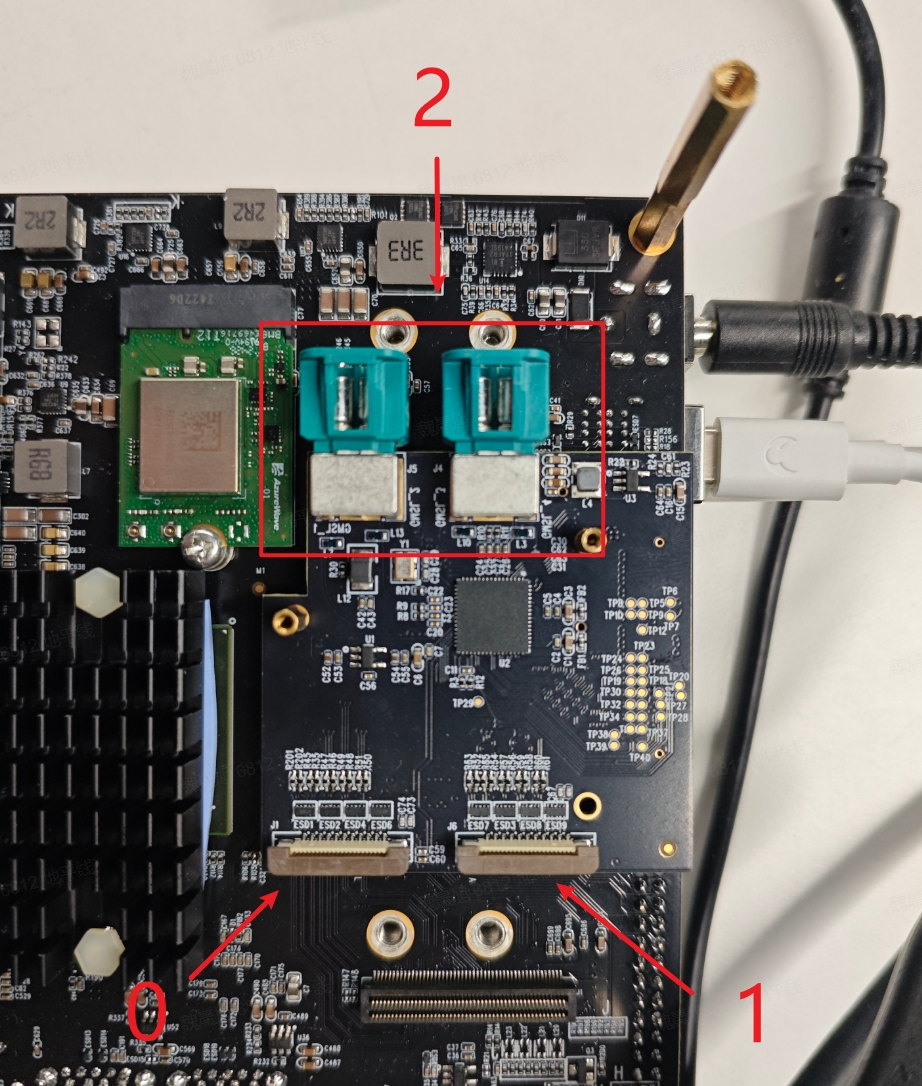
| video_index | Host ID corresponding to the camera; -1 indicates auto-detection | Values: -1, 0, 1, 2 (see "Host ID Selection" section for details) |
| fps | Camera output frame rate | Depends on camera model; default: 30 |
| width | Final output image width of the camera | Depends on camera model; default: 1920 |
| height | Final output image height of the camera | Depends on camera model; default: 1080 |
| raw_height | Original RAW image output height of the camera | Depends on camera model; default: 1920 |
| raw_width | Original RAW image output width of the camera | Depends on camera model; default: 1080 |
#create camera object
camera = libsrcampy.Camera()

#open MIPI Camera, fps: 30, solution: 1080p
ret = camera.open_cam(0, -1, 30, 1920, 1080)
| Return Value | Description |
|---|---|
| 0 | Success |
| -1 | Failure |
The parameters width and height support input of type list, which enables the camera to output multiple resolutions simultaneously. The list supports up to 6 scaled-down outputs, with scaling ratios in the range [1, 1/64) relative to the camera’s native resolution. Example usage:
ret = cam.open_cam(0, -1, 30, [1920, 1280], [1080, 720])
The parameters raw_height and raw_width should only be set when the camera does not use its default resolution. For example, when using an IMX477 camera and wishing to output both 4K (3840×2160) and 1080P (1920×1080) simultaneously, you can use:
cam.open_cam(0, -1, 10, [3840, 1920], [2160, 1080], 3000, 4000)
Currently supported camera resolutions are listed below:
| Camera | Resolution |
|---|---|
| IMX219 | 1920x1080@30fps (default) |
Switching the IMX477 camera from 1080P resolution to another resolution requires a manual reset. You can perform this reset on the board by running hobot_reset_camera.py.
The S100 chip has alignment requirements for VPS output:
- Output width must be aligned to 16 bytes.
- Output height must be aligned to 2 bytes.
If your configured width or height does not meet these alignment requirements, an error will be reported.
None
open_vps
【Function Description】Enables the VPS (Video Processing System) image processing functionality for the specified camera channel, supporting operations such as scaling and cropping on the input image.
【Function Declaration】Camera.open_vps(pipe_id, proc_mode, src_width, src_height, dst_width, dst_height, crop_rect, rotate, src_size, dst_size)
| Parameter Name | Description | Value Range |
|---|---|---|
| pipe_id | Pipeline channel ID corresponding to the camera | Starts from 0 by default; range: 0–7 |
| proc_mode | Image processing mode (supports scaling, cropping + scaling) | Values 1–4: scaling, cropping + scaling |
| src_width | Input image width | Depends on camera output width |
| src_height | Input image height | Depends on camera output height |
| dst_width | Output image width | [1, 1/64) × input width |
| dst_height | Output image height | [1, 1/64) × input height |
| crop_rect | Cropping region dimensions in format [x, y] | Must not exceed input image dimensions |
| rotate | Rotation angle (currently unsupported; max two channels support rotation) | Values 0–3: no rotation, 90°, 180°, 270° |
| src_size | Reserved parameter | Not required by default |
| dst_size | Reserved parameter | Not required by default |
#create camera object
camera = libsrcampy.Camera()

#enable vps function
ret = camera.open_vps(1, 1, 1920, 1080, 512, 512)
| Return Value | Description |
|---|---|
| 0 | Success |
| -1 | Failure |
- VPS supports up to 6 output channels and only downscaling. Scaling ratio range: [1, 1/64). Multi-channel configurations are passed via
listparameters. - Image cropping uses the top-left corner as the origin and crops according to the specified dimensions.
- Cropping is applied before scaling and rotation. Multi-channel configurations are passed via
listparameters.
The S100 chip has alignment requirements for VPS output:
- Output width must be aligned to 16 bytes.
- Output height must be aligned to 2 bytes.
If your configured width or height does not meet these alignment requirements, an error will be reported.
#creat camera object
camera = libsrcampy.Camera()

#enable vps function
#input: 4k, output0: 1080p, output1: 720p
#ouput0 croped by [2560, 1440]
ret = camera.open_vps(0, 1, 3840, 2160, [1920, 1280], [1080, 720], [2560, 1440])
【Reference Code】
None
get_img
【Function Description】Retrieves the image output from the camera object. This method must be called after open_cam or open_vps.
Camera.get_img(module, width, height)
| Parameter Name | Description | Value Range |
|---|---|---|
| module | Module from which to retrieve the image | Default: 2 |
| width | Width of the image to retrieve | Must match the output width configured in open_cam or open_vps |
| height | Height of the image to retrieve | Must match the output height configured in open_cam or open_vps |
cam = libsrcampy.Camera()

#open MIPI Camera, fps: 30, solution: 1080p
ret = cam.open_cam(0, 1, 30, 1920, 1080)

#wait for 1s
time.sleep(1)

#get one image from camera
img = cam.get_img(2)
| Return Value | Description |
|---|---|
| 0 | Success |
| -1 | Failure |
【Notes】
This method must be called after open_cam or open_vps.
import sys, os, time

from hobot_vio import libsrcampy

def test_camera():
    cam = libsrcampy.Camera()

    # open MIPI camera, fps: 30, resolution: 1080p
    ret = cam.open_cam(0, 1, 30, 1920, 1080)
    print("Camera open_cam return:%d" % ret)

    # wait for 1s
    time.sleep(1)

    # get one image from camera
    img = cam.get_img(2)
    if img is not None:
        # save file
        fo = open("output.img", "wb")
        fo.write(img)
        fo.close()
        print("camera save img file success")
    else:
        print("camera save img file failed")

    # close MIPI camera
    cam.close_cam()
    print("test_camera done!!!")

test_camera()
set_img
【Function Description】Input image data into the vps module and trigger image processing.
Camera.set_img(img)
| Parameter Name | Description | Value Range |
|---|---|---|
| img | Image data to be processed | Must match the VPS input resolution |
camera = libsrcampy.Camera()

# enable vps function, input: 1080p, output: 512x512
ret = camera.open_vps(1, 1, 1920, 1080, 512, 512)
print("Camera vps return:%d" % ret)

fin = open("output.img", "rb")
img = fin.read()
fin.close()

# send image to vps module
ret = vps.set_img(img)
| Return Value | Description |
|---|---|
| 0 | Success |
| -1 | Failure |
This API must be called after open_vps.
import sys, os, time

import numpy as np
import cv2
from hobot_vio import libsrcampy

def test_camera_vps():
    vps = libsrcampy.Camera()

    # enable vps function, input: 1080p, output: 512x512
    ret = vps.open_vps(1, 1, 1920, 1080, 512, 512)
    print("Camera vps return:%d" % ret)

    fin = open("output.img", "rb")
    img = fin.read()
    fin.close()

    # send image data to vps
    ret = vps.set_img(img)
    print ("Process set_img return:%d" % ret)

    fo = open("output_vps.img", "wb+")

    # get image data from vps
    img = vps.get_img()
    if img is not None:
        fo.write(img)
        print("encode write image success")
    else:
        print("encode write image failed")
    fo.close()

    # close vps function
    vps.close_cam()
    print("test_camera_vps done!!!")

test_camera_vps()
close_cam
【Function Description】Disable the enabled MIPI camera.
【Function Declaration】Camera.close_cam()
None
【Usage】cam = libsrcampy.Camera()
# open MIPI camera, fps: 30, resolution: 1080p
ret = cam.open_cam(0, 1, 30, 1920, 1080)
print("Camera open_cam return:%d" % ret)
# close MIPI camera
cam.close_cam()
None
【Notes】None
【Reference Code】None
Host ID Selection
The host ID corresponding to the camera is shown in the figure below: