2.1. Environment Deployment
2.1.1. Foreword
D-Robotics OpenExplorer currently provides 2 sets of model quantization schemes at the same time.
PTQ: Post-training Quantization.
QAT: Quantization aware training, which only supports the Pytorch framework for now.
Of these:
Both solutions do not interfere with the training phase of the floating-point model, which is your own responsibility. D-Robotics also open-sources some classification/detection/segmentation scenarios in the following paths Public version of Pytorch implementation of efficient models for reference, and support for training and replication on the host computer.
ddk/samples/ai_toolchain/horizon_model_train_sample
For PTQ scheme, you need to quantize the model in the host development environment, and then copy the compiled
.binmodel to the development board environment.for subsequent deployment.For the QAT scheme, you need to complete the QAT training of the model in the host development environment, then perform the quantization conversion, and then copy the compiled
.hbmmodel to the development board environment for subsequent deployment.
For both of the above quantization schemes and the development environment of the efficient model, D-Robotics provides both local manual installation and Docker containers. We strongly recommend using Docker containers that do not pollute the local environment and are easy to use, which will also be introduced separately below.
2.1.2. Development Environment Deployment
2.1.2.1. Download OE Package
Please first download the OE package and extract it correctly on the development machine. Sample models are included in the model_zoo directory of the OE package.
2.1.2.2. Development Machine Preparation
In order to use the toolchain smoothly, D-Robotics recommends that the development machine you choose should meet the following requirements.
HW/OS |
REQUIREMENTS |
|---|---|
CPU |
CPU above I3 or same level processor as E3/E5 |
Memory Size |
16G or above |
GPU |
CUDA11.6, Drive Version: Linux:>= 510.39.01* (Recommended Drive Version: Linux:515.76) Adapted graphics cards include but are not limited to:
5)A100 |
OS |
Ubuntu 20.04 |
For more information about CUDA compatibility with graphics cards, refer to NVIDIA website information.
In addition, embedded development requires the installation of
cross-compilation tools, please get them by executing the resolve.sh in the ddk/package/host directory
and extract them into the /opt directory of the development machine (you can skip this step if you use Docker).
The extract command is:
tar xvf gcc-ubuntu-9.3.0-2020.03-x86_64-aarch64-linux-gnu.tar.xz
tar xvf gcc_linaro_6.5.0_2018.12_x86_64_aarch64_linux_gnu.tar.xz
Also, you need to add the LINARO_GCC_ROOT variable. The value is the complete path of cross compiler,
refer to the following command:
export LINARO_GCC_ROOT=/opt/gcc-ubuntu-9.3.0-2020.03-x86_64-aarch64-linux-gnu
export LINARO_GCC_ROOT=/opt/gcc-linaro-6.5.0-2018.12-x86_64_aarch64-linux-gnu
Note
The LINARO_GCC_ROOT needs to be set to the same path as the directory where the cross compiler is unpacked, otherwise it will fail.
For host-side (x86) dependent libraries, such as isl,gmp,mpc,mpfr, etc. If you use lib/x86_64-linux-gnu, please specify them by LD_LIBRARY_PATH in the compiled project if the compilation reports errors.
If there is a glibc library version conflict problem during compilation, for example: the error of undefined symbols for xxx@GLIBC_xxx,
please specify the path to aarch64-linux-gnu/lib of the toolchain by -rpath-link in the compiled project, and at the same time
add -lxxx to the compiled project, for example: -lpthread.
In addition, you should pay special attention to the variable SRCS, which is boxed below to record the source file. It is better to put it in front of the ${LIBS} link library, otherwise it will also report undefined symbols.

2.1.2.3. Docker Container Deployment
2.1.2.3.1. Docker Base Environment
D-Robotics requires the following Docker base environment, please complete the installation on your host computer in advance.
Docker(19.03 and above, 19.03 is recommended), the installation manual is https://docs.docker.com/install/.
NVIDIA Container Toolkit (1.13.1-1.13.5, 1.13.5 is recommended), refer to installation manual NVIDIA Container Toolkit installation manual.
After completing the installation of the Docker environment, remember to add non-root users into Docker users group after installation by running below command:
sudo groupadd docker
sudo gpasswd -a ${USER} docker
sudo systemctl restart docker  # Ubuntu
# re-login
Use the following links to obtain the Docker images required in this section:
The naming form of the image files is as follows:
GPU Docker:
docker_open_explorer_ubuntu_20_xj3_gpu_{version}.tar.gzCPU Docker:
docker_open_explorer_ubuntu_20_xj3_cpu_{version}.tar.gz
Tip
Replace the {version} by the actual version number.
2.1.2.3.2. Docker Image Usage
To help users quickly use the toolchain, D-Robotics provides a Docker image containing the complete development environment, which greatly simplifies the deployment process of the development environment.
Note
If you have downloaded the offline image, you need to use the following command to load the image locally first.
docker load -i docker_openexplorer_xxx.tar.gz
You can start the Docker container corresponding to the current OE version by running the following script directly from the first level of the OE package(the script will automatically pull the image from the official Docker hub if there is no local image):
sh run_docker.sh data
Where data is the path to the evaluation dataset folder. Please create the path before running the command, otherwise loading problems may occur.
If you want to use the CPU version of the Docker image, you need to add the cpu parameter:
sh run_docker.sh data/ cpu
The download link for the relevant public evaluation dataset on which the OE package sample relies is:
he download link for the relevant public evaluation dataset on which the OE package sample relies is:
Dataset |
Download Address |
Download Structure |
|---|---|---|
ImageNet |
For download structure, please refer to ImageNet dataset reference structure |
|
COCO |
For download structure, please refer to COCO dataset reference structure |
|
VOC |
Need to download both versions 2007 and 2012, for download structure, please refer to VOC dataset reference structure |
|
Cityscapes |
For download structure, please refer to Cityscapes dataset reference structure |
|
CIFAR-10 |
For download structure, please refer to CIFAR-10 dataset reference structure |
If you have problems with the data preparation process, please contact D-Robotics.
If you want to start the Docker container manually, you can refer to the following command, where {version} is the OE version number you are currently using.
Note
For your convenience, we provide you with two types of CPU Docker as well as GPU Docker to choose from on demand.
CPU Docker:
# CPU Docker
docker pull openexplorer/ai_toolchain_ubuntu_20_xj3_cpu:{version}
# Start CPU Docker image manually
docker run -it --rm
  -v {OE package path}:/open_explorer \ # Mount OE package
  -v ./dataset:/data/horizon_xj3/data \ # Mount dataset
  openexplorer/ai_toolchain_ubuntu_20_xj3_cpu:{version}
GPU Docker:
# GPU Docker
docker pull openexplorer/ai_toolchain_ubuntu_20_xj3_gpu:{version}
# Start GPU Docker image manually
docker run -it --rm
  --gpus all \ # Include the flag when you start a container to access GPU resources
  --shm-size=15g \ # Change the shared memory size
  -v {OE package path}:/open_explorer \ # Mount OE package
  -v {dataset path}:/data/horizon_xj3/data \ # Mount dataset
  openexplorer/ai_toolchain_ubuntu_20_xj3_gpu:{version}
Attention
Since the environment variables
PATHandLD_LIBRARY_PATHare configured during the build process of the OE Docker image, not using the recommended way (e.g., docker attach) to enter the container may result in the environment variables not being loaded correctly, which may lead to the use of abnormalities in tools such as Cmake, GCC, CUDA, and so on.If you want the Docker container to exit without removing it, use the command line
docker run -itto start it manually, without the--rmoption.If you want the Docker container to run background after startup, add the
-doption after the command linedocker run -it, the container ID will be returned after the container is started, and then you can enter the container again with the commanddocker exec -it {container ID} /bin/bash.
After successfully entering the Docker container, you can verify that you are getting the help information
by typing the hb_mapper command, which is an important tool in the toolchain.
It will be described in detail in The hb_mapper Tools section later.
2.1.2.4. Local Manual Installation
This section describes the local manual installation environment method, and introduces the environment-related dependencies and descriptions for each of the two quantization schemes and D-Robotics open-source efficient model training. We recommend prioritizing the easy-to-use PTQ quantization scheme after the floating-point model training, and switch to the QAT quantization scheme only when accuracy issues cannot be solved.
2.1.2.4.1. Local Manual Installation Environment Method
To manually install the environment locally, simply run the script below to complete the environment installation in one click.
cd ddk/package/host
bash install.sh
The installation script will automatically check the environment. If there are missing dependencies or configurations, it will interrupt the installation process and give suggestions to fix it, as shown below:
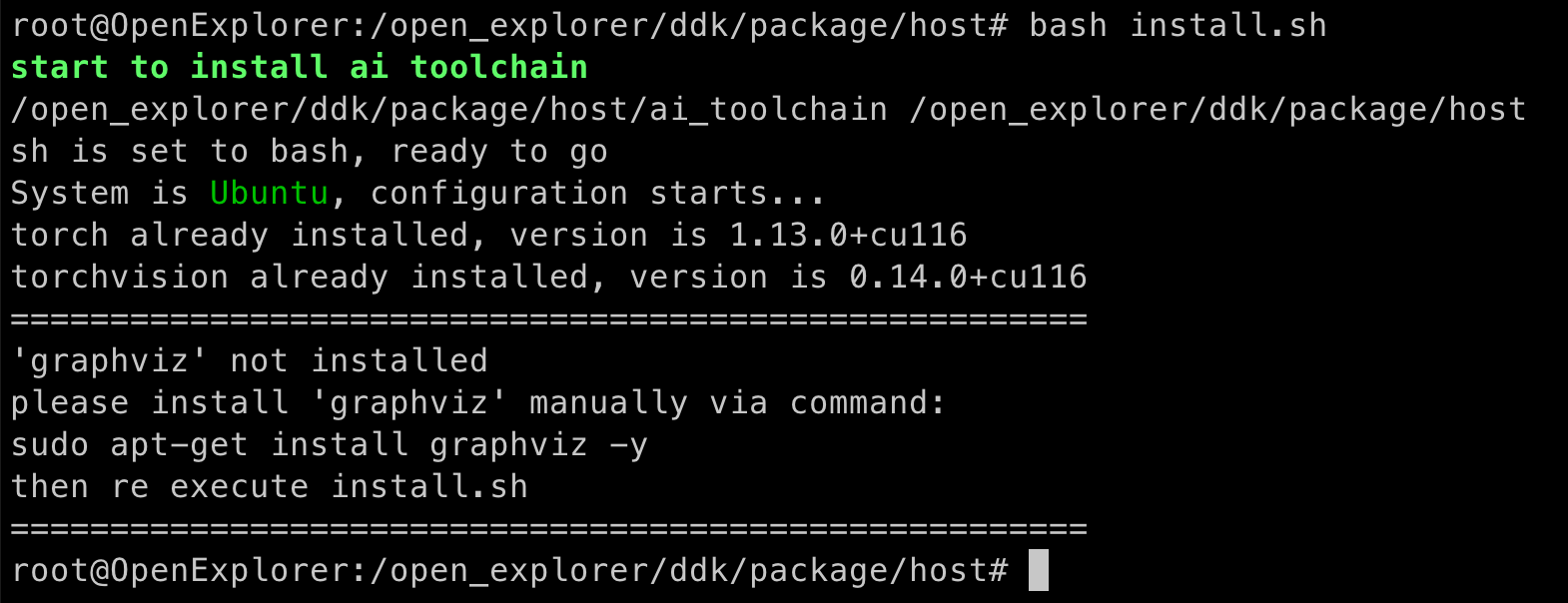
Run the script again after adding the dependencies as suggested.
Note
If the script suggests that gcc/g++ versions are incorrect, you need to recreate the gcc and g++ soft links as gcc-5.4.0 and g++-5.4.0 after the required versions are installed.
The installation script will automatically check the environment. If there are missing dependencies or configurations, it will interrupt the installation process and you can run the script again after adding the dependencies as suggested.
After the installation script is completed successfully, it will add path and other information to the
~/.bashrcsystem environment variable(The environment variableLD_LIBRARY_PATHis often used and it is recommended that you check that the environment variable is as expected), runsource ~/.bashrcto make the current terminal configuration take effect.The torch version should be 1.13.0 and the torchvision version should be 0.14.0.
After successfully completing the install script, you can type the command ddk_vcs list to verify that the tools and dependencies you need are installed correctly.
2.1.2.4.2. PTQ Quantization Environment Dependence
The PTQ quantification scheme has the following software dependencies on the base software of the development machine operating environment.
Operating system: Ubuntu20.04
Python3.8
libpython3.8
python3-devel
python3-pip
gcc&g++: 5.4.0
graphviz
2.1.2.4.3. QAT Quantization Environment Dependence
The QAT quantization environment is installed in the local environment and you need to ensure that the following basic environmental conditions are met. The environmental dependencies necessary for the quantitative training tool to be able to train are listed below.
HW/OS |
GPU |
CPU |
|---|---|---|
os |
Ubuntu20.04 |
Ubuntu20.04 |
cuda |
11.6 |
N/A |
python |
3.8 |
3.8 |
torch |
1.13.0+cuda-11.6 |
1.13.0+cpu |
torchvision |
0.14.0+cuda-11.6 |
0.14.0+cpu |
Recommended Graphics Cards |
titan v/2080ti/ v100/3090 |
N/A |
After completing the training of the QAT model, we can take one of the following two approaches to complete the subsequent model conversion.
Approach 1: Export the onnx model first, and then complete the model conversion by using yaml file based on the PTQ scheme(For this approach we recommend that you use the docker provided by D-Robotics directly).
Approach 2: Install the relevant toolkits in the current training environment and complete the model conversion directly through the interface call.
2.1.2.4.4. Efficient Model Floating-point Training Environment Instruction
D-Robotics provides the source code of several open-source efficient models in ddk/samples/ai_toolchain/horizon_model_train_sample. For information on the floating-point and QAT base environment, refer to section QAT Quantization Environment Deployment.
2.1.3. Runtime Environment Deployment
Once the model has been quantized, the compiled model can be deployed on the development board environment for inference runs. To deploy the runtime environment, you need to prepare a development board with a programmed system image, and then copy the relevant supplementary files to the development board.
2.1.3.1. Development Board Preparation
At this stage, you need to verify the availability of the development board and program the available system images into the board. Please refer to section Development Board Kit and System Image Description for the details of the process.
2.1.3.2. Dev Board Preparation
Some of the complementary tools of the toolchain are not included in the system image, but can be copied to the development board by executing the installation script in the OE package in the host environment, with the following reference commands:
cd ddk/package/board
bash install.sh ${board_ip}
Note
Where ${board_ip} is the IP address you set for the development board, please make sure that you can successfully access this IP on the development machine.
After the supplemental files are successfully installed, please restart the development board and execute hrt_model_exec --help on the development board to verify if the installation is successful.