PHY 驱动调试指南
前言
PHY(Port Physical Layer), 是
地瓜芯片Ethernet-PHY相关能力与约束
地瓜Ethernet-PHY接口
支持
全双工/半双工 模式。 支持100Mbps及1000Mbps,不
支持10Mbps。 支持RGMII、RMII类型MII数据
接口,不 支持 其他 接口类型。 支持MDIO接口,X3/J3/J5支持 Clause22,J5支持Clause 45。MDIO接口
时钟 可调(缺省2M,根据IEEE 802.3,建议 时钟 范围 在1M-2.5之间,另外 如 无 特殊 需求 不 建议 调整)。 支持1.8V电源
域,不 支持3.3V及其 他 电源 域。 支持
输出 一路25MHz的EPHY_CLK作为 外部PHY的 参考 时钟。 不
支持clock delay,需要phy或者switch支持 相关feature并 开启。 不
支持 额外 的 复位 引脚,如 有 需要 需 可以 根据 电路板 实际 情况 复用 其他 引脚。 不
支持phy的 中断 模式,只 支持 轮询 读取phy的 状态。
电路设计checklist(系统软件
MII接口(rgmii/rmii/mdio)电平
只 支持1.8V电源 域。 PHY复位
引脚 如果 使用GPIO驱动,确保 使用 的PIN,复位 逻辑,复位 时间 等 与dts描述 一致。 PHY复位
引脚 连接RC或 其他 复位 电路,确保 在 被 访问 之前 复位 芯片 处于 复位 完成 状态。 地瓜
芯片 不 支持 调整clock delay,所以 需要PHY默认 开启 此 功能 或者 提供 对应 的 驱动 开启 此 功能。
Uboot下PHY的适配
编译配置
在uboot下,GMAC驱动
打开marvell phy的
# uboot/configs/xj3_soc_defconfig
CONFIG_PHY_MARVELL=y
DTS配置
在
new_project.dts:
#include "hobot-xj3.dtsi"
......
&gmac {
        status = "okay";
        phyaddr = <0xe>;          //phy地址 当前phy地址为0xe
        phy-mode = "rgmii-id";    //phy模式,如果是rmii,则填入phy-mode = "rmii-id";
};
......
X3/J3只
由于X3 GMAC不
static const char * const phy_interface_strings[] = {
		...
        [PHY_INTERFACE_MODE_RMII]               = "rmii",
        [PHY_INTERFACE_MODE_RGMII]              = "rgmii",
        [PHY_INTERFACE_MODE_RGMII_ID]           = "rgmii-id", # rx and tx delay
        [PHY_INTERFACE_MODE_RGMII_RXID]         = "rgmii-rxid", # rx delay
        [PHY_INTERFACE_MODE_RGMII_TXID]         = "rgmii-txid", # rx delay
		...
};
如果
PIN驱动能力配置
如果
EMAC驱动源码适配方法
如果
是 标准PHY芯片,且 电路设计 参考dvb,cvb,sdb等 参考 设计,则 一般 情况 下 无需 修改。 如果PHY的
复位 引脚 使用 的 与 参考 设计 不同,则 建议 在eqos_probe入口处 完成 复位 逻辑。
例如
1.根据
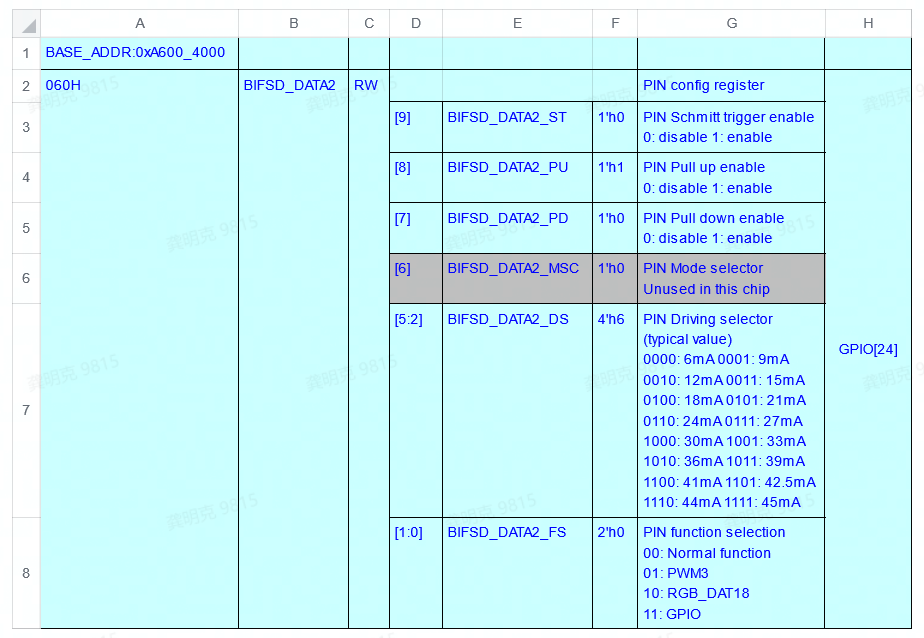
2.根据
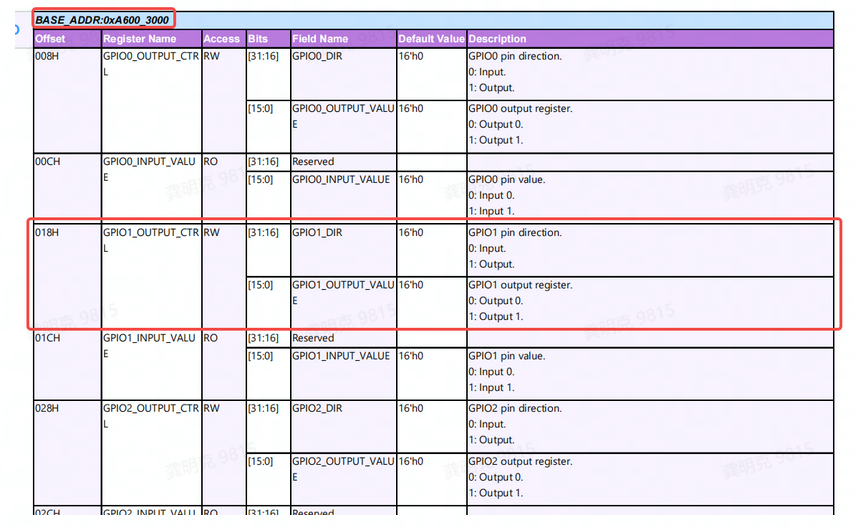
3.根据PHY芯片
static int eqos_probe(struct udevice *dev)
{
    unsigned int reg_val;
    ......
    // 设置PIN功能为GPIO
    reg_val = readl(0xA6004060);
    reg_val |= 0x3;
    writel(reg_val, 0xA6004060);
    ......
    // 设置GPIO1.8方向为输出
    reg_val = readl(0xA6003018);
    reg_val |= 0x01000000;
    writel(reg_val, 0xA6003018);
    ......

    // 复位逻辑
    reg_val = readl(0xA6003018);
    reg_val &= ~0x00000100;    // 拉低GPIO1.8
    mdelay(10);               // 拉低持续10ms

    reg_val = readl(0xA6003018);
    reg_val |= 0x00000100;    // 拉高GPIO1.8
    mdelay(20);
    ......
    // 可正常访问PHY寄存器
}
如果
如果PHY芯片
的 自 协商 时间 较长(超过4s),可 修改 宏PHY_ANEG_TIMEOUT(uboot/include/phy.h)延长 超时 判定 时间。 无论
在uboot阶段 是否 使用 网卡,都 需要 对uboot的dts做 正确 的 配置。
测试方法
在uboot下
IP地址:192.168.1.195
掩码:255.255.255.0
网关:192.168.1.1
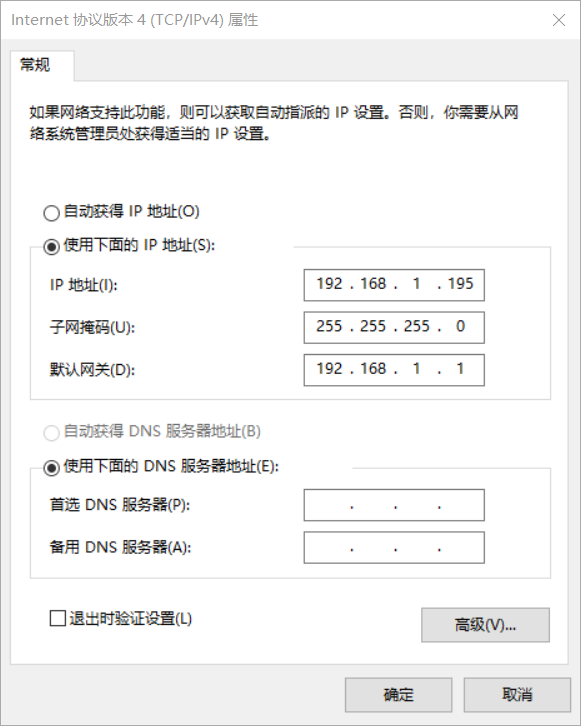
然后
Hobot>setenv ipaddr 192.168.1.10
Hobot>ping 192.168.1.195
如果
常见问题
EQOS_DMA_MODE_SWR stuck
如果
Kernel下PHY的适配
编译配置
在kernel下,同样
CONFIG_MARVELL_PHY=y

DTS配置
在
new_project.dts:
#include "hobot-xj3.dtsi"
......
ðernet {
status = "okay";
phy-handle = <&phy1>;
phy-mode = "rgmii-id"; //如果是rmii,此处填入phy-mode = "rmii-id"
mdio {
#address-cells = <0x1>;
#size-cells = <0x0>;
#ifndef FIXED_PHY
// PHY设备
/* EPHY_CLK(gpio2.6) is in gpio mode and use it as RESET for PHY */
// 复位低电平有效,如果是高电平有效,则填入“GPIO_ACTIVE_HIGH”
// 如果phy芯片不依赖gpio,则可不填此项
reset-gpios = <&gpios 38 GPIO_ACTIVE_LOW>;
/* reset pin must assert at least extra delay 50ms for MARVELL 88EA1512 */
reset-delay-us = <20000>;
/*
注意reset_extra_us用于描述在复位之后额外等待的时间,单位us。
此为自定义属性,在较老版本中不支持,如果需要可以打上如下参考patch:
*/
reset_extra_us = <60000>;
phy1: phy@e {
//"ethernet-phy-ieee802.3-c22"必填项,且不支持X3/J3不支持C45
compatible = "marvell,88E1111","ethernet-phy-ieee802.3-c22";
reg = <0xe>; //当前phy地址为0xe, 与phy@e一致
};
#endif
};
#ifdef FIXED_PHY
// switch 设备
// 如果是连接一个switch设备,则可以添加如下节点:
// 当前例子中:id为1(保证唯一即可),全双工,1000M,不支持Pause与Asym Pause
// 参考:kernel/Documentation/devicetree/bindings/net/ethernet-controller.yaml
fixed-link = <1 1 1000 0 0>;
#endif
};
如果
0001-ethernet-phy-fix-XJ3-4013-Fixed-ETH-PHY-initializati.patch
pinctrl-dts适配方法
如果
pinctrl: pinctrl@0xA6004000 {
    ......
    eth_func: eth_func {
        pinctrl-single,pins = <
            0x098   (MUX_F3 | DRIVE1_06MA | SCHMITT1_DIS | PULL1_DOWN)
            0x09c   (MUX_F0 | DRIVE1_03MA | SCHMITT1_DIS | PULL1_UP)
            0x0a0   (MUX_F0 | DRIVE1_03MA | SCHMITT1_DIS | PULL1_UP)
            0x0a4   (MUX_F0 | DRIVE1_03MA | SCHMITT1_ENA | PULL1_DOWN)
            0x0a8   (MUX_F0 | DRIVE1_03MA | SCHMITT1_DIS | PULL1_UP)
            0x0ac   (MUX_F0 | DRIVE1_03MA | SCHMITT1_DIS | PULL1_UP)
            0x0b0   (MUX_F0 | DRIVE1_03MA | SCHMITT1_DIS | PULL1_UP)
            0x0b4   (MUX_F0 | DRIVE1_03MA | SCHMITT1_DIS | PULL1_UP)
            0x0b8   (MUX_F0 | DRIVE1_03MA | SCHMITT1_DIS | PULL1_DOWN)
            0x0bc   (MUX_F0 | DRIVE1_12MA | SCHMITT1_DIS | PULL1_DIS)
            0x0c0   (MUX_F0 | DRIVE1_12MA | SCHMITT1_DIS | PULL1_DIS)
            0x0c4   (MUX_F0 | DRIVE1_12MA | SCHMITT1_DIS | PULL1_DIS)
            0x0c8   (MUX_F0 | DRIVE1_12MA | SCHMITT1_DIS | PULL1_DIS)
            0x0cc   (MUX_F0 | DRIVE1_12MA | SCHMITT1_DIS | PULL1_DIS)
            0x0d0   (MUX_F0 | DRIVE1_12MA | SCHMITT1_DIS | PULL1_DIS)
        >;
        };
    ......
}
例子
DRIVE1_XXMA 属性
EMAC驱动适配方法
MDIO速率
调整 方法(如 无 必要 不 建议 调整)
X3/J3芯片
priv->csr_val = 0 , mdio时钟频率 = 参考时钟/42
priv->csr_val = 1 , mdio时钟频率 = 参考时钟/62
priv->csr_val = 2 , mdio时钟频率 = 参考时钟/16
priv->csr_val = 3 , mdio时钟频率 = 参考时钟/26
priv->csr_val = 4 , mdio时钟频率 = 参考时钟/102
priv->csr_val = 5 , mdio时钟频率 = 参考时钟/124
priv->csr_val = 6 , mdio时钟频率 = 参考时钟/204
priv->csr_val = 7 , mdio时钟频率 = 参考时钟/324
当前
RMII-PHY适配
1.RMII的kernel驱动
2.RMII-PHY在100M模式
diff --git a/drivers/net/ethernet/hobot/hobot_eth.c b/drivers/net/ethernet/hobot/hobot_eth.c
--- a/drivers/net/ethernet/hobot/hobot_eth.c
+++ b/drivers/net/ethernet/hobot/hobot_eth.c
@@ -1175,11 +1175,11 @@ static void xj3_set_speed(struct xj3_priv *priv) {
         rate_L2 = clk_round_rate(priv->plat->xj3_mac_div_clk, target);
         clk_set_rate(priv->plat->xj3_mac_div_clk, rate_L2);
     } else if (phydev->speed == SPEED_100) {
-        target = 125000000;
+        target = 150000000;
         rate_L1 = clk_round_rate(priv->plat->xj3_mac_pre_div_clk, target);
         clk_set_rate(priv->plat->xj3_mac_pre_div_clk, rate_L1);

-        target = 25000000;
+        target = 50000000;
         rate_L2 = clk_round_rate(priv->plat->xj3_mac_div_clk, target);
         clk_set_rate(priv->plat->xj3_mac_div_clk, rate_L2);
测试方法
同样
设置PC网卡
IP地址:192.168.1.195
掩码:255.255.255.0
网关:192.168.1.1
然后
ifconfig eth0 192.168.1.10 netmask 255.255.255.0
route add default gw 192.168.1.1
再
ping 192.168.1.195

PING 192.168.1.195 (192.168.1.195) 56(84) bytes of data.
64 bytes from 192.168.1.195: icmp_seq=1 ttl=128 time=0.801 ms
常用工具介绍
uboot下工具
mii:主要
用于 读写phy的 寄存器。
mii - MII utility commands

Usage:
mii device                            - list available devices
mii device <devname>                  - set current device
mii info   <addr>                     - display MII PHY info
mii read   <addr> <reg>               - read  MII PHY <addr> register <reg>
mii write  <addr> <reg> <data>        - write MII PHY <addr> register <reg>
mii modify <addr> <reg> <data> <mask> - modify MII PHY <addr> register <reg>
                                        updating bits identified in <mask>
mii dump   <addr> <reg>               - pretty-print <addr> <reg> (0-5 only)
Addr and/or reg may be ranges, e.g. 2-7.
例如:
// 读寄存器
Hobot>mii read 0xe 2
0141
// 读寄存器,并进行解析
Hobot>mii dump 0xe 0
0.     (1140)                 -- PHY control register --
  (8000:0000) 0.15    =     0    reset
  (4000:0000) 0.14    =     0    loopback
  (2040:0040) 0. 6,13 =   b10    speed selection = 1000 Mbps
  (1000:1000) 0.12    =     1    A/N enable
  (0800:0000) 0.11    =     0    power-down
  (0400:0000) 0.10    =     0    isolate
  (0200:0000) 0. 9    =     0    restart A/N
  (0100:0100) 0. 8    =     1    duplex = full
  (0080:0000) 0. 7    =     0    collision test enable
  (003f:0000) 0. 5- 0 =     0    (reserved)
// 查看当前mii设备列表
Hobot# mii device
MII devices: 'ethernet@59110000' 'ethernet@59120000'
Current device: 'ethernet@59110000'
// 切换mii当前使用的设备
Hobot# mii device ethernet@59120000
Hobot# mii device
MII devices: 'ethernet@59110000' 'ethernet@59120000'
Current device: 'ethernet@59120000'
md:主要
用于 读 内存/IO寄存器。
md - memory display

Usage:
md [.b, .w, .l, .q] address [# of objects]
例如:

Hobot>md 0xA1000000
a1000000: 01102064 00001010 00000001 00000000    d ..............
a1000010: 0120107d 00001010 00000001 00000000    }. .............
a1000020: 0130107d 00001010 00000001 00000000    }.0.............
a1000030: 01101042 00003000 00000001 00a80000    B....0..........
a1000040: 01101044 00001010 00000001 00000000    D...............
......
mw:主要
用于 写 内存/IO寄存器
mw - memory write (fill)

Usage:
mw [.b, .w, .l, .q] address value [count]

例如:
Hobot>mw 0x20000000 0x1
Hobot>md 0x20000000
20000000: 00000001 ffffffff ffffffff ffffffff    ................
20000010: ffffffff ffffffff ffffffff ffffffff    ................
......
ping:用于
探测 网络 连通性。
ping - send ICMP ECHO_REQUEST to network host

Usage:
ping pingAddress

Hobot>setenv ipaddr 192.168.1.10        //需要线设置本地ip,应该为同网段的合法ip
Hobot>ping 192.168.1.200
Phy name:Marvell 88E1518
Phy uid:1410dd0
ethernet@A5014000 Waiting for PHY auto negotiation to complete....... done
set mac_div_clk = 125000000Using ethernet@A5014000 device
host 192.168.1.200 is alive            // 测试结果为网络通常
kernel下工具介绍
ethtool:网络
状态 查看/修改 工具。
查看当前网络link状态
root@x3dvbx3-samsung1G-3200:~# ethtool eth0
Settings for eth0:
        Supported ports: [ TP MII ]
        Supported link modes:   10baseT/Full        //当前网卡支持的能力
                                100baseT/Full
                                1000baseT/Full
        Supported pause frame use: Symmetric Receive-only
        Supports auto-negotiation: Yes
        Supported FEC modes: Not reported
        Advertised link modes:  10baseT/Full        //广播的本方能力
                                100baseT/Full
                                1000baseT/Full
        Advertised pause frame use: No
        Advertised auto-negotiation: Yes            //自协商开启
        Advertised FEC modes: Not reported
        Link partner advertised link modes:  10baseT/Half 10baseT/Full  //对端能力
                                             100baseT/Half 100baseT/Full
                                             1000baseT/Full
        Link partner advertised pause frame use: Symmetric Receive-only
        Link partner advertised auto-negotiation: Yes
        Link partner advertised FEC modes: Not reported
        Speed: 1000Mb/s    //协商后的速率,双共,端口类型等
        Duplex: Full
        Port: MII
        PHYAD: 14            // PHY 地址为14
        Transceiver: internal
        Auto-negotiation: on
        Link detected: yes

// 修改网卡连接能力,比如修改为固定100M双规模式
ethtool -s eth0 autoneg off speed 100 duplex full

之后再通过ethtool读取最新的状态
root@x3dvbx3-samsung1G-3200:~# ethtool eth0
Settings for eth0:
        Supported ports: [ TP MII ]
        Supported link modes:   10baseT/Full        //网卡支持的能力
                                100baseT/Full
                                1000baseT/Full
        Supported pause frame use: Symmetric Receive-only
        Supports auto-negotiation: Yes
        Supported FEC modes: Not reported
        Advertised link modes:  100baseT/Full        //只广播100M能力
        Advertised pause frame use: No
        Advertised auto-negotiation: No              //关闭自协商
        Advertised FEC modes: Not reported
        Speed: 100Mb/s        //link状态,100M全双工
        Duplex: Full
        Port: MII
        PHYAD: 14            // PHY 地址为14
        Transceiver: internal
        Auto-negotiation: off
        Link detected: yes
phytool:phy reg读写
工具(X3/J3老 版本 不 支持,J5支持)
Usage: phytool read  IFACE/ADDR/REG
       phytool write IFACE/ADDR/REG <0-0xffff>
       phytool print IFACE/ADDR[/REG]
where

ADDR := C22 | C45
C22  := <0-0x1f>
C45  := <0-0x1f>:<0-0x1f>
REG  := <0-0x1f>

Examples:
       phytool read  eth0/0:3/1
       phytool write eth0/0xa/0 0x1140
       phytool print eth0/0x1c
对于X3/J3,较
0001-eth-phy-feat-XJ3-4413-Add-code-supported-by-the-phyt.patch
gmac_rw_phy.sh(仅X3/J3):X3/J3提供
的 读写PHY寄存器 的 工具,需要 说明 的 时,由于kernel也 一直 在 进行 对phy的 访问,所以 建议 使用 此 工具 时 多次 操作 以 确认 访问 成功。
gmac_rw_phy.sh是X3/J3芯片提供的一个读写寄存器的脚本,其使用方法如下:
# 常用命令
# 读Phy=0xe(地址)、reg=0连续32个寄存器
# ./gmac_rw_phy.sh 0xe read_phy  0 32
#
# 写Phy=0xe(地址)、reg=1、val=0xc83d
# ./gmac_rw_phy.sh 0xe write_phy  1 0xc83d
例如:
root@x3dvbx3-samsung1G-3200:/userdata# ./gmac_rw_phy.sh 0xe read_phy 0 32
0x2100 0x2100 0x0141 0x0dd4 0x0141 0x0000 0x0004 0x2001
0x0000 0x0200 0x0000 0x0000 0x0000 0x0003 0x0000 0x3000
0x3070 0x6c08 0x0000 0x6400 0x0020 0x0000 0x0000 0x0000
0x0000 0x0000 0x0040 0x0000 0x0000 0x0000 0x0000 0x0000
tcpdump/wireshark:wireshark是windows版本
的 抓 包 工具,功能强大 使用 也 很 简单,此处 不再 详述。tcpdump是Linux环境 工具,地瓜 芯片 支持 该 工具 的 精简 版本(部分 很 老 的 版本 没有,后 附 文件 供 下载),tcpdump工具 强大,但 对于PHY相关 功能,只 需要 最 基本 的 一些 选项 即可,例如:
root@x3dvbx3-samsung1G-3200:~# tcpdump -h
tcpdump version 4.9.2
libpcap version 1.9.1 (with TPACKET_V3)
OpenSSL 1.1.1g  21 Apr 2020
Usage: tcpdump [-aAbdDefhHIJKlLnNOpqStuUvxX#] [ -B size ] [ -c count ]
                [ -C file_size ] [ -E algo:secret ] [ -F file ] [ -G seconds ]
                [ -i interface ] [ -j tstamptype ] [ -M secret ] [ --number ]
                [ -Q in|out|inout ]
                [ -r file ] [ -s snaplen ] [ --time-stamp-precision precision ]
                [ --immediate-mode ] [ -T type ] [ --version ] [ -V file ]
                [ -w file ] [ -W filecount ] [ -y datalinktype ] [ -z postrotate-command ]
                [ -Z user ] [ expression ]

//抓取eth0网口上的包
root@x3dvbx3-samsung1G-3200:~# tcpdump -i eth0
tcpdump: verbose output suppressed, use -v or -vv for full protocol decode
listening on eth0, link-type EN10MB (Ethernet), capture size 262144 bytes
08:04:33.567718 IP 192.168.1.10.ssh > 192.168.1.200.51017: Flags [P.], seq 2043263027:2043263219, ack 955812216, win 315, length 192
08:04:33.572145 IP 192.168.1.10.ssh > 192.168.1.200.51017: Flags [P.], seq 192:416, ack 1, win 315, length 224
08:04:33.572376 IP 192.168.1.10.ssh > 192.168.1.200.51017: Flags [P.], seq 416:496, ack 1, win 315, length 80
......

//抓取eth0网口上的包并保存在t1.pcap文件中(*.pcap包可以直接在wireshark中打开)
root@x3dvbx3-samsung1G-3200:~# tcpdump -i eth0 -w /userdata/t1.pcap
tcpdump: listening on eth0, link-type EN10MB (Ethernet), capture size 262144 bytes
ifconfig:ifconfig是Linux中
用于 显示 或 配置 网络设备 的 工具,ifconfig工具 较为 强大,但 通常 在PHY相关 的 网络应用 中 只 需 使用 最 基本 的 选项 即可,例如:
root@x3dvbx3-samsung1G-3200:/# ifconfig -h
Usage:
  ifconfig [-a] [-v] [-s] <interface> [[<AF>] <address>]
  [add <address>[/<prefixlen>]]
  [del <address>[/<prefixlen>]]
  [[-]broadcast [<address>]]  [[-]pointopoint [<address>]]
  [netmask <address>]  [dstaddr <address>]  [tunnel <address>]
  [outfill <NN>] [keepalive <NN>]
  [hw <HW> <address>]  [metric <NN>]  [mtu <NN>]
  [[-]trailers]  [[-]arp]  [[-]allmulti]
  [multicast]  [[-]promisc]
  [mem_start <NN>]  [io_addr <NN>]  [irq <NN>]  [media <type>]
  [txqueuelen <NN>]
  [[-]dynamic]
  [up|down] ...

  <HW>=Hardware Type.
  List of possible hardware types:
    loop (Local Loopback) slip (Serial Line IP) cslip (VJ Serial Line IP)
    slip6 (6-bit Serial Line IP) cslip6 (VJ 6-bit Serial Line IP) adaptive (Adaptive Serial Line IP)
    ether (Ethernet) netrom (AMPR NET/ROM) tunnel (IPIP Tunnel)
    ppp (Point-to-Point Protocol) arcnet (ARCnet) dlci (Frame Relay DLCI)
    frad (Frame Relay Access Device) irda (IrLAP)
  <AF>=Address family. Default: inet
  List of possible address families:
    unix (UNIX Domain) inet (DARPA Internet) inet6 (IPv6)
    netrom (AMPR NET/ROM)

// 查看网卡状态
root@x3dvbx3-samsung1G-3200:/# ifconfig eth0
eth0      Link encap:Ethernet  HWaddr 00:61:7d:31:9f:b9
          inet addr:192.168.1.10  Bcast:192.168.1.255  Mask:255.255.255.0
          inet6 addr: fe80::261:7dff:fe31:9fb9/64 Scope:Link
          UP BROADCAST RUNNING MULTICAST  MTU:1500  Metric:1
          RX packets:191166 errors:0 dropped:1 overruns:0 frame:0//统计数据
          TX packets:313229 errors:0 dropped:0 overruns:0 carrier:0
          collisions:0 txqueuelen:1000
          RX bytes:12269756 (11.7 MiB)  TX bytes:44393384 (42.3 MiB)
          Interrupt:43 Base address:0xa000

// 修改网卡ip地址为192.168.1.100 子网掩码 255.255.255.0
root@x3dvbx3-samsung1G-3200:/# ifconfig eth0 192.168.1.100 netmask 255.255.255.0
root@x3dvbx3-samsung1G-3200:/# ifconfig eth0
eth0      Link encap:Ethernet  HWaddr 00:61:7d:31:9f:b9
          inet addr:192.168.1.100  Bcast:192.168.1.255  Mask:255.255.255.0
          inet6 addr: fe80::261:7dff:fe31:9fb9/64 Scope:Link
          UP BROADCAST RUNNING MULTICAST  MTU:1500  Metric:1
          RX packets:191225 errors:0 dropped:1 overruns:0 frame:0
          TX packets:313259 errors:0 dropped:0 overruns:0 carrier:0
          collisions:0 txqueuelen:1000
          RX bytes:12273296 (11.7 MiB)  TX bytes:44398076 (42.3 MiB)
          Interrupt:43 Base address:0xa000